 (+91) 8853765397
 NEWSLETTER





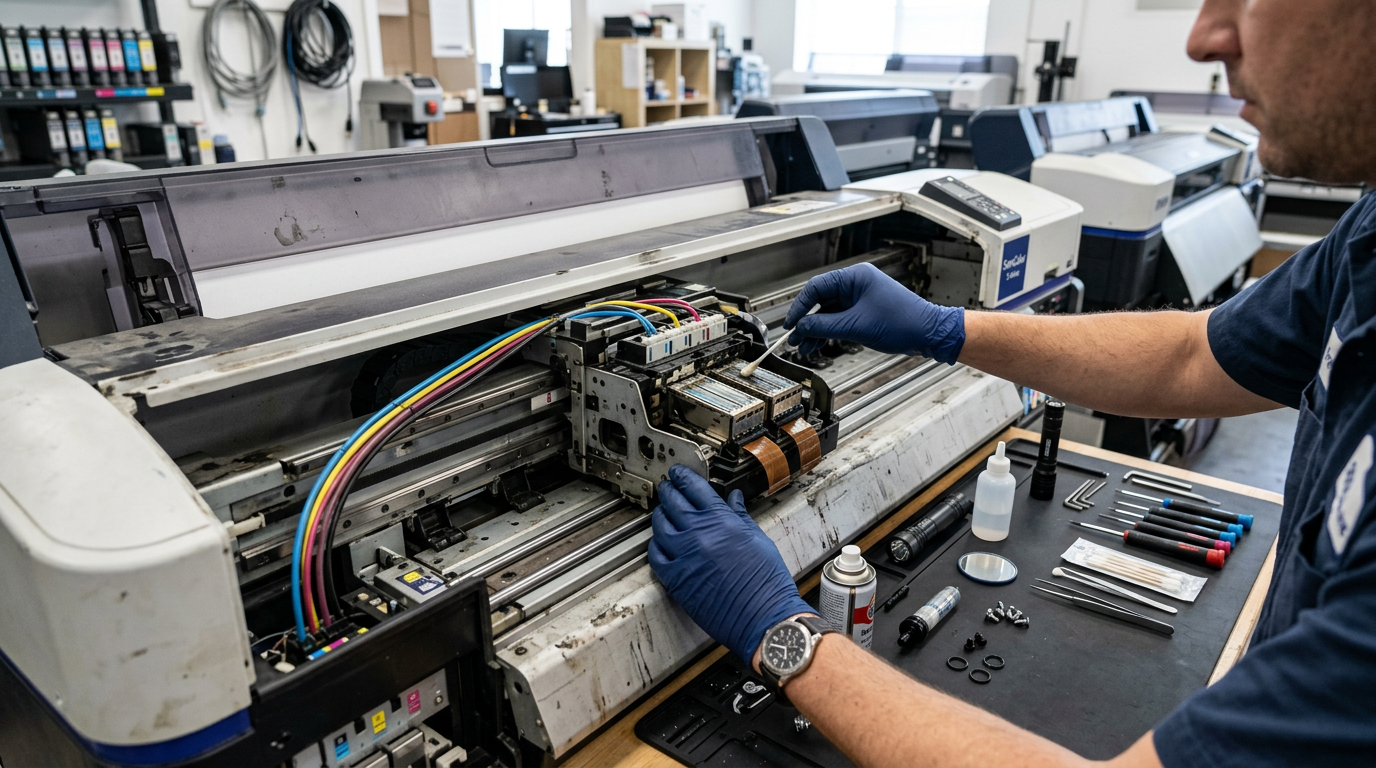
Quick Answer: The ten most common flex printing machine problems are: clogged nozzles, banding lines, ink dripping, media skewing/wrinkling, colour shifts, head strikes, static-caused ink misting, encoder errors, pump/capping failures, and RIP/communication faults. Roughly 70% can be fixed in-house in under 30 minutes — most trace back to skipped daily cleaning, worn capping stations, or dirty encoder strips. This guide gives you the symptoms, root causes, step-by-step fixes, and prevention routines for each, so you save the ₹2,000–₹5,000 service call and, more importantly, the lost production day.
Every flex machine owner in India shares the same 7 AM ritual: power on, nozzle check, and that small prayer looking at the test pattern. When the pattern shows gaps — or worse, yesterday’s perfect machine opens today with banding, drips, or an error beep — the day’s revenue sits hostage to a fix you either know or don’t.
Here’s the truth service engineers won’t volunteer: most machine “breakdowns” are maintenance debts coming due. The machine was signalling for days — a slight band, a slow drain, an occasional error — and the fix now costs ten times the fix then. This guide walks through the ten problems that account for nearly all flex machine downtime in Indian conditions, with actual repair steps your operator can perform, honest boundaries of when DIY ends, and the daily discipline that keeps you off this list entirely.
Quick Diagnosis Table
| Symptom | Most Likely Cause | First Fix to Try | Severity |
|---|---|---|---|
| Missing lines in nozzle test | Clogged nozzles / dried ink | 2× normal clean cycles → deep clean | 🟡 Common, DIY |
| Horizontal bands across print | Partially blocked nozzles / feed calibration | Nozzle check → clean → bi-di calibration | 🟡 Common, DIY |
| Ink dripping onto media | Worn wiper/capping or overfilled sub-tank | Inspect & clean wiper/capping | 🟠 Parts may be needed |
| Media walks sideways / wrinkles | Pitch rollers, tension, loading alignment | Reload with square edge, adjust pinch rollers | 🟡 Common, DIY |
| Colours wrong vs last week | Ink batch change, ICC drift, jet-out compensation | Re-profile/check ink lot, head alignment | 🟡 Common, DIY |
| Scrape marks / head hit media | Media buckle, head height, vacuum weak | Increase vacuum, raise head, check loading | 🔴 Fix immediately — head at risk |
| Fuzzy/misty edges on solid fills | Static electricity / low humidity | Anti-static measures, humidity 45–60% | 🟡 Environmental |
| Carriage jerks / misaligned passes | Dirty encoder strip or sensor | Clean encoder strip gently | 🟠 Careful DIY |
| Heads not charging / drain dry | Ink pump or capping assembly failure | Check pump rotation, capping seal | 🔴 Parts + maybe technician |
| Machine offline / data stops mid-print | USB/network drop, RIP crash, board fault | Restart RIP, reseat cables, spool test | 🟡 Common, DIY |
Problem 1: Clogged Nozzles (Missing Nozzles in Test Pattern)
Symptoms: Gaps in the nozzle test pattern; lines of missing colour within solid fills; a colour channel entirely absent after an idle weekend.
Root causes: Dried ink at the nozzle plate (the #1 cause — solvent ink dries fast), prolonged machine idle time without wet-capping, dust contamination, degraded dampers letting air into the head, or a failing capping station seal allowing heads to dry overnight.
How to Fix: Step by Step
- Run 1–2 normal clean cycles from the machine panel and re-check the nozzle pattern. Most light clogs clear here.
- If gaps persist, run a flash/deep clean cycle. Check pattern again. Use deep cleans sparingly — they consume significant ink.
- Still blocked? Do a manual syringe soak: place lint-free swab soaked in head-cleaning solution under the affected head on the capping station for 10–15 minutes — a controlled wet-cap. Never force solution through nozzles with excessive syringe pressure; that permanently damages nozzle plates.
- For stubborn clogs, remove and inspect the damper: a cracked or air-leaking damper starves nozzles and mimics clogging. Replacement dampers cost ₹150–₹400 and fix a surprising share of “dead head” diagnoses.
- Verify recovery with three consecutive clean patterns before resuming production.
Prevention: Nozzle check every morning, wet-cap with cleaning solution every idle night, never power off with heads parked dry, keep the print room dust-managed. Maintenance minutes are measured in rupees saved.
Problem 2: Banding — Horizontal Lines Across the Print
Symptoms: Repeating light/dark horizontal stripes across the print, most visible in gradients and mid-tones. Sometimes uni-directional, sometimes both.
Root causes: Partially clogged nozzles (most common), incorrect bi-directional alignment after transport or head replacement, feed-step calibration drift, media tension inconsistency, or printing in too fast a pass mode for the media/ink combination.
How to Fix
- Start with the nozzle test — banding with missing nozzles is a cleaning problem (fix per above), not a calibration problem.
- Nozzles perfect? Run bi-directional alignment from the RIP/panel utilities. Re-run until vertical test lines coincide exactly. Machine vibration and head-height changes drift this setting over weeks.
- Run media feed/step calibration — print the step-check pattern and adjust feed percentage until bands vanish. Different media (thin vinyl vs heavy flex) need different step settings; save profiles per media in the RIP.
- Check pinch roller pressure and media tension — slipping feed throws every calibration off.
- If banding persists only on specific colours, suspect a tired head with inconsistent drop volume; compensation exists in most RIPs but plan head replacement.
Prevention: Save calibrated profiles per media type; re-run bi-di alignment monthly and always after head work or machine relocation.
Problem 3: Ink Dripping / Smearing on Media
Symptoms: Random ink drops on finished areas, smudged text, occasional ink trails in the direction of carriage travel.
Root causes: A worn, ink-caked wiper blade leaving residue that flicks onto media; an overflowing or poorly sealing capping station; overfilled sub-tanks from faulty float sensors; condensed ink mist accumulating under the head plate and releasing in blobs; or head height set too low.
How to Fix
- Power down, open the maintenance station, and inspect the wiper: a ₹250–₹600 consumable that should be flexible and clean. Hardened, warped, or ink-cemented wipers both smear prints and fail to protect nozzles overnight. Replace — it’s the cheapest high-impact part on the machine.
- Clean the capping top: remove built-up ink scum rimming the seal. A bad seal shows up twice — as drips and as morning clogs.
- Check sub-tank ink levels and float behaviour — an overfilled sub-tank causes gravity drips. Clean or replace faulty sensors.
- Wipe the head’s underside plate (machine off, head unlocked) with solution-dampened swab — never touching nozzle rows directly.
- Verify head height matches media thickness; 1.8–2.2 mm is typical for flex.
Prevention: Weekly wiper and capping cleaning; quarterly wiper replacement in heavy-use shops; never defer it — this single habit prevents half of all “mystery print defects.”
Problem 4: Media Skewing, Wrinkling & Buckling
Symptoms: The roll feeds at a creeping angle, print drifts off-parallel, edges wrinkle mid-roll, or the media centrebuckles upward toward the heads.
Root causes: Media loaded without squaring the edge to the machine, uneven pinch roller pressure (or rollers left up from the last media change), wrong take-up tension, temperature-related media softening near heater banks, or cheap media with inherent weave/stretch (common in unbranded stock).
How to Fix
- Unload. Trim the media edge square with a straight cutter — never trust factory roll edges to be true.
- Reload slowly, confirming the media feeds parallel for the first 2 metres with pinch rollers down along the full width, per machine spec.
- Adjust take-up tension — too tight stretches thin media (registration shift), too loose lets it wander.
- Lower pre-heater settings a few degrees if wrinkling starts mid-print on hot days; overheated PVC flex softens and buckles.
- For chronic skew with one media batch: the media cupping is material-grade. Shift to a better roll stock for long runs.
Prevention: Store rolls horizontally on racks (standing rolls oval and feed crooked), acclimatise media to room temperature before loading, and never leave a roll loaded under full tension overnight.
Problem 5: Colour Shifts & Wrong/Changing Colours
Symptoms: Corporate blue prints slightly purple this week; skin tones drift across a long banner; the left and right halves of a wide print don’t match.
Root causes: Changed ink batch or brand (biggest culprit), an aging head with changing drop volume, RIP ICC profile no longer matching media/ink, platen temperature variation affecting ink laydown, or jet-out compensation maps gone stale.
How to Fix
- Check ink lots first: note the batch number; if the shift coincides with new ink, that’s your answer. Re-profile or revert to documented lots.
- Re-linearise and re-apply the ICC profile for that media-ink pair; serious shops maintain a printed colour-chart reference library per profile.
- Run head-by-head solid-fill comparisons — a fading channel points to a head approaching end-of-life rather than colour management issues.
- Check heater setpoints — platen temp drift of even 4–5°C visibly shifts saturation on coated media.
- Left-right mismatch: run bi-di alignment and check for partial edge nozzles out on one side.
Prevention: Buy ink in bulk lots of one batch when possible; record settings + batch numbers in your maintenance register; re-profile quarterly and always on consumable changes.
Problem 6: Head Strikes (Scrapes, Gouges, Catastrophic Risk)
Symptoms: Scrape lines in carriage direction, sudden grinding sound, instant smeared prints — and the sinking realisation that something went very wrong.
Root causes: Media buckling upward into the head path (heat-softened media, vacuum too weak), media edge curl, head height set for thinner media, debris on the platen, or loose/torn media edges flapping upward.
How to Fix (and Contain Damage)
- STOP the job immediately — every additional pass grinds the nozzle plate.
- Inspect the media path: buckle point, curl, debris, or height mismatch. Resolve before any resume.
- Increase vacuum suction, lower heater on soft media, tape down problem edges on critical runs.
- Run nozzle test: minor plate contact often just needs cleaning cycles. If nozzles are physically damaged, no cleaning recovers them — the head needs replacement; this is the ₹30,000–₹45,000 lesson about buckle prevention.
Prevention: Vacuum on, head height matched to media, pre-feed inspection of every roll’s leading metres, and an operator trained to hear the difference between normal carriage sound and first-contact scrape.
Problem 7: Static Electricity — Ink Misting & Fuzzy Edges
Symptoms: Fine mist overspray around solid fills, text edges looking fuzzy, airborne dust sticking to prints — dramatically worse in dry winter months or AC-heavy rooms.
Root causes: PVC flex generating triboelectric charge as it unrolls; humidity below ~40%; missing/degraded earthing; no anti-static provisions on media path.
How to Fix
- Raise room humidity to 45–60% — a ₹2,000–₹4,000 humidifier transforms winter print quality.
- Verify machine earthing — earth-to-neutral under 5V measured at the socket. Indian site earthing is frequently nominal at best.
- Fit anti-static brushes/tinsel strips across the media path (cheap, standard accessory).
- Wipe media’s print surface with anti-static solution on extreme cases.
Prevention: Humidity monitoring year-round (₹300 hygrometer on the wall), earthed circuits verified quarterly, static kit as standard equipment.
Problem 8: Encoder Strip Errors — Jerky Carriage, Misaligned Passes
Symptoms: Carriage stutters or thumps at certain positions, text prints with ghost shadow, registration wandering within a print, occasional “encoder error” messages.
Root causes: Dust/ink mist accumulated on the encoder strip (the long transparent ruled strip the carriage reads for position), encoder sensor dust, or strip scratches from careless cleaning.
How to Fix
- Power off. Locate the encoder strip along the carriage rail.
- Clean gently with a lint-free swab very lightly dampened with distilled water or recommended cleaner — the strip’s printed rulings damage easily. One direction, no pressure, no soaking.
- Clean the encoder sensor window (on the carriage) with air blower/dry swab.
- Never touch the strip with fingers; oils corrupt position reading locally.
- Scratched or faded strips cost ₹500–₹1,500 to replace and cure chronic, mysterious misalignment.
Prevention: Monthly strip cleaning in the maintenance routine; print-room dust control pays for itself here alone.
Problem 9: Ink Pump & Capping Station Failures
Symptoms: Cleaning cycles run but no ink flows; heads drain dry overnight; waste-ink bottle stays empty while problems multiply.
Root causes: Peristaltic pump tube worn flat (consumable), pump motor failure, cracked capping top seal letting the head dry, clogged waste lines, or fatigued capping elevation springs leaving the seal mis-seated.
How to Fix
- Test pump pull: during cleaning, watch/listen for waste flow at the capping station drain tube. No movement = pump, tube, or blockage.
- Inspect the pump tube — flattened peristaltic tubes are a ₹300–₹800 replacement and the usual culprit.
- Check capping top integrity: cracks, permanent deformation, and dried ink rims all break the seal. Replacement capping tops (₹250–₹700) resolve a huge share of “heads dry every morning” cases.
- Flush waste lines with cleaning solution if flow is sluggish.
- Pump motor or capping mechanism failures edge into technician territory — the parts are cheap; the calibration is the expertise.
Prevention: Quarterly capping/wiper/tube refresh on a schedule (mark the calendar), not on failure.
Problem 10: RIP Crashes, Data Stops & Communication Faults
Symptoms: Print halts mid-job, machine “offline” in RIP, jobs stuck in queue, mysterious pauses with partial output wasted.
Root causes: USB cables of cheap quality or excessive length, Windows updates/power settings sleeping the PC mid-print, RIP license dongle contact issues, corrupted job files, insufficient PC RAM for large jobs, or failing mainboard USB/network ports.
How to Fix
- Short-route the basics: quality USB cable under 1.5m directly to the PC (no hubs), or wired network where supported.
- Set the print PC to never sleep, disable USB selective suspend, freeze automatic Windows updates during production hours.
- Reseat the RIP dongle; verify license recognition in software.
- Test with a known-good small job: isolates file corruption vs machine faults.
- Upgrade print-PC to 8–16 GB RAM with SSD — a ₹25,000 machine feeding a ₹5,00,000 printer is false economy.
- Persistent dropouts after all this point to board-level faults — that’s technician territory.
Prevention: Dedicated print-only PC, monthly restart discipline, and no driver-shuffling experiments mid-production-week.
The Maintenance Schedule That Prevents All Ten
| Frequency | Task | Prevents |
|---|---|---|
| Daily (morning) | Nozzle pattern + spot clean | Clogs, banding, head loss |
| Daily (night) | Wet-cap heads, cover machine | Morning clogs |
| Weekly | Wiper + capping deep clean; vacuum system check | Drips, dry-outs, strikes |
| Monthly | Encoder strip clean; bi-di alignment; rail lubrication | Registration faults, wear |
| Quarterly | Replace wiper/capping/dampers; pump tube check; earthing test; ICC re-profile | Chronic quality drift |
| Annually | Full service by technician; belt/tension/bearing check | Mechanical surprises |
Spare Parts Kit Every Owner Should Stock (With Prices)
The shops that survive breakdowns with minimal downtime keep a bench inventory — the parts that fail on schedule, priced in hundreds, that idle a lakh-rupee machine when missing:
| Part | Approx. Price | Stock Qty | Why It Matters |
|---|---|---|---|
| Ink dampers | ₹150–₹400 each | 8–12 | Crack/air-leak mimics head failure; 2-min swap |
| Capping station tops | ₹250–₹700 each | 4 (one full set + spares) | Seal failure = nightly head drying |
| Wiper blades | ₹250–₹600 each | 3–4 | Dirty wipes cause drips and smears |
| Peristaltic pump tubes | ₹300–₹800 | 2 | Flattened tubes stop all cleaning function |
| Encoder strip (machine-specific) | ₹500–₹1,500 | 1 | Scratches kill registration; niche to source fast |
| Lint-free swabs + nitrile gloves | ₹500/kit | Monthly resupply | Proper cleaning without residue/scratches |
| Head cleaning solution (OEM-grade) | ₹800–₹1,500/litre | 2 litres | Never run dry — this is your emergency medicine |
| USB/data cable (quality) | ₹400–₹800 | 2 | Mid-print dropouts traced to ₹200 cables weekly |
| Fuses + common panel spares | ₹100–₹500 | Assorted | Power-event days end with fuses, not engineers |
Total bench investment: roughly ₹12,000–₹18,000 — the price of about two service visits, against which it prevents dozens.
Seasonal Problems in Indian Conditions (And Their Counters)
India’s calendar stresses machines differently by season — plan for each:
Summer (Mar–Jun): Ambient heat thickens solvent ink and pushes head temperatures toward error margins; platen rooms touching 40°C+ see viscosity shifts, faster dry-out of seals, and colour drift. Counters: AC discipline (20–28°C target), shade the machine wall from direct sun, store ink indoors (never in the machine oven).
Monsoon (Jul–Sep): Humidity spikes past 80% soften media coatings, slow ink drying (offset between printed layers, backdrop smudging on rewind/take-up), and corrode connectors. Counters: dehumidifier/AC dry mode, media stored wrapped with desiccant, connector contact spray during quarterly service, longer post-heater dwell settings.
Winter (Nov–Feb): North India’s dry cold triggers static-electricity season — misting, fuzzy text edges, dust attraction — plus ink viscosity rising overnight gives stubborn first-hour clogs. Counters: humidifiers to 45–60% RH, anti-static kit, morning warm-up flush cycles before production files.
Festival/dust events (Diwali, threshing season, construction nearby): Airborne particulate invades encoder strips and nozzle plates in days. Counters: machine covers when idle, monthly strip cleaning stepping to fortnightly, door discipline in the print room.
The Cost of Neglect vs the Cost of Care (Real Numbers)
Owners ask whether maintenance routines are “worth the time.” Tabulated for one working year of a 4-head machine:
| Approach | Time Invested | Money Spent/Year | Typical Outcome |
|---|---|---|---|
| Disciplined maintenance | ~20 min/day + quarterly kit swaps | ₹40,000–₹70,000 (consumables + 2 services) | Head life 24–30 months; <3% downtime; predictable output |
| Reactive repair culture | Zero routine time; firefighting days | ₹1,50,000–₹3,00,000 (early head deaths + emergency calls + reprints) | Head life 9–14 months; 8–15% downtime; deadline failures |
The delta — ₹1–2 lakh/year plus customer-trust damage from missed deadlines — buys an enormous amount of motivation to keep a 20-minute morning routine. In the Indian market’s ₹12–15/sq-ft reality, maintenance is not a cost centre; it is the margin.
When to Stop DIY and Call the Technician
In-house fixes end at clear boundaries: electrical board faults, head replacement calibration, pump motor swaps, carriage mechanical work, and anything requiring firmware-level reset. The rule that protects owners: if the fix risks touching the nozzle plate, the mainboard, or the alignment of moving parts — the ₹2,000–₹5,000 service visit is dramatically cheaper than the ₹30,000 lesson. Document faults with photos and error messages before the call; engineers resolve reported-and-documented issues roughly twice as fast as “it doesn’t print properly.”
Frequently Asked Questions (FAQs)
Q1. Why does my flex printer clog nozzles every Monday morning?
Classic idle-weekend drying. The capping seal isn’t holding moisture or heads aren’t wet-capped before shutdown. Fix: cleaning-solution wet-cap Friday night, verify capping top condition, and run a short Saturday print cycle if the shop is closed weekends.
Q2. Can a clogged print head be permanently repaired?
Most clogs (90%+) are dried ink and clear with soak-cleaning. Truly permanent damage comes from head strikes, forced syringe pressure, electrical faults, or very long neglect. Run three recovery attempts across 24 hours — persistent single-colour gaps after proper soaks usually mean end-of-life.
Q3. How often should I replace the wiper and capping station?
Heavy-use shops: quarterly. Moderate use: every 4–6 months. These ₹500 consumables protect ₹1.5+ lakh of heads — the best rupee-per-protection ratio on the entire machine.
Q4. What humidity should the print room maintain?
45–60% RH. Below 40%, static misting and dust attraction surge; above 70%, media handling and ink drying degrade. A wall hygrometer and small humidifier solve winter-quality complaints instantly.
Q5. My prints band even after cleaning and alignment. What’s left?
Check, in order: media feed calibration for that specific media, platen heater uniformity, ageing head’s drop volume (test solid fills per channel), and encoder strip cleanliness. Persistent uni-colour banding across all these points to head replacement due.
Q6. Is it safe to clean heads manually with syringes?
Soaking from below via the capping station: safe and standard. Forcing cleaning solution through nozzles under syringe pressure: dangerous — nozzle plates rupture at pressures enthusiastic hands easily produce. Soak, don’t push.
Q7. Why do colours change between two rolls of the same media?
Media coating variance between lots, particularly in unbranded stock. Re-check ICC profile fit per new lot, or standardise on consistent branded media for colour-critical clients.
Q8. The carriage thumps at one position every pass. What is it?
Mechanical obstruction classically — debris on the rail, dry rail needing lubrication, damaged belt tooth, or loose encoder strip end. Power down and inspect the full carriage travel by hand-movement slowly; the cause is usually findable in minutes.
Q9. What’s the average annual maintenance cost of a flex machine?
Consumables (wipers, cappings, dampers, cleaning solution): ₹15,000–₹30,000. Service visits 2–4× yearly: ₹6,000–₹20,000. Heads on 18–30 month cycles: ₹1.5–3 lakh amortised. Well-maintained machines hold total care under ₹1–1.2 lakh/year, heads aside.
Q10. Should I buy local compatible spare parts?
Consumables like dampers, tubes, and cappings: quality-compatible parts from reputable suppliers work fine and cost 30–50% less. Heads, boards, and pumps: buy genuine or dealer-warranted only — counterfeits in these categories convert savings into machine damage.
Final Word: Maintenance Is Profit
Review the ten problems and a pattern emerges: nearly all are scheduled-maintenance items that graduated into emergencies. The print shops with the best uptime in India aren’t lucky — they’re running 20 minutes of daily discipline that the market’s strugglers deferred. Print the maintenance schedule, pin it above the machine, and sign it daily: your heads, your uptime, and your month-end P&L will all reflect it.
Need spare parts or consumables for your machine? We stock genuine printer spare parts — dampers, capping stations, wipers, pumps, boards — plus original-grade inks with pan-India delivery. Facing a stubborn machine problem? Contact our technical team for remote diagnosis support.
