

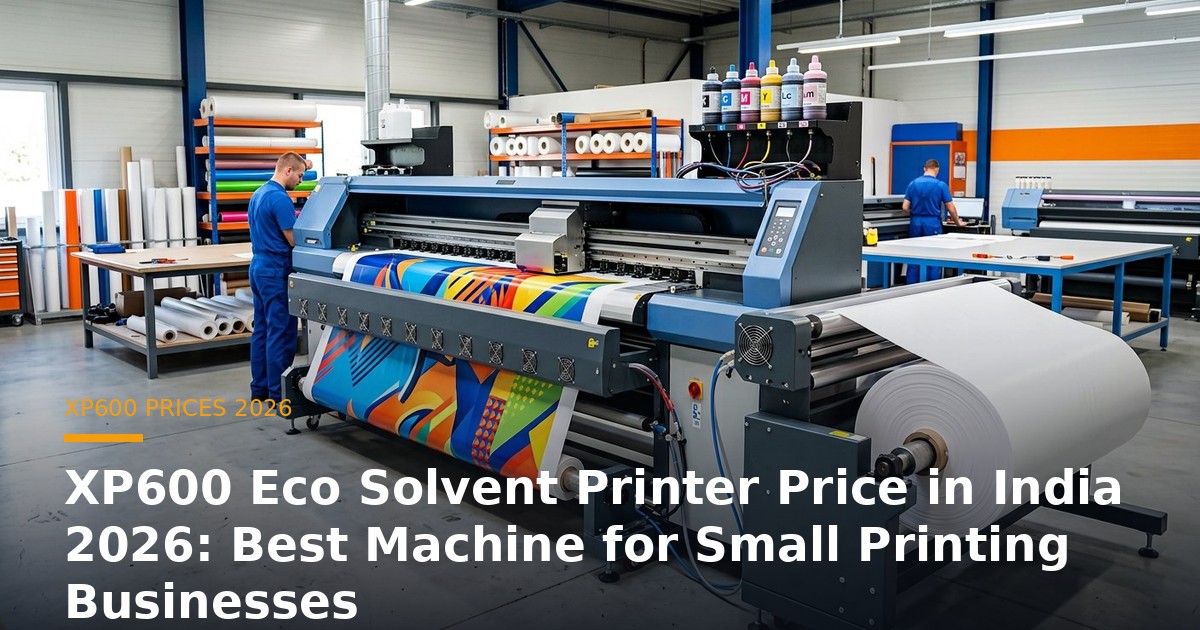
The XP600 is the most affordable and widely used entry-level printhead in the Indian printing market, and it powers a huge number of small eco-solvent print businesses. If you are researching the XP600 eco solvent printer price in India for 2026, this guide explains what these machines cost, what they can do, and why the XP600 is often the smartest first machine for a small printing business.
For a first-time entrepreneur or a small shop with modest volume, the XP600 offers the lowest possible entry cost while still producing saleable, durable eco-solvent output. It keeps your break-even achievable and your financial risk low while you build your customer base — which is exactly what a new business needs.
XP600 Eco Solvent Printer Price in India 2026 — Snapshot
| Configuration | Width | Indicative Price (2026) |
|---|---|---|
| XP600 single-head | 6 ft | ₹1.8L – ₹2.5L |
| XP600 single/dual-head | 8 ft | ₹2.2L – ₹3.2L |
| XP600 dual-head | 10 ft | ₹3.0L – ₹4.0L |
The XP600 is the cheapest way to get into eco-solvent printing, with most small businesses choosing a 6 ft or 8 ft single-head machine in the ₹1.8–3.2 lakh range.
Why the XP600 Is Ideal for Small Printing Businesses
The XP600’s great strength is affordability. It lowers the barrier to entry so a new business can start producing saleable output without a large capital outlay, and its ink and maintenance costs are modest, keeping running expenses low at small volumes. For a shop serving local customers with shop boards, banners, stickers and posters, the XP600 delivers perfectly good quality at a price that makes the business viable from the outset. Many successful printers started on an XP600, learned the market, and upgraded to an i3200 or Konica machine once demand grew.
What an XP600 Machine Can Do
An XP600 eco-solvent machine handles a wide range of everyday print jobs: flex banners, shop boards and fascia signage, vinyl stickers and decals, posters, small backlit panels, one-way vision and sun-control films, and event graphics. Within its speed limits it produces durable, outdoor-grade output that satisfies most local and retail customers. It is not the fastest head, so it suits businesses with modest to moderate volume rather than high-throughput bulk production — but for a small shop, its output quality is more than adequate.
XP600 vs Epson i3200
The choice between the XP600 and the Epson i3200 comes down to budget versus quality. The XP600 is cheaper to buy and run, making it ideal for start-ups and price-sensitive work. The i3200 costs more but produces sharper text and smoother gradients, which matters for premium, detail-sensitive jobs. If your customers are local businesses needing standard signage and banners, the XP600 is plenty. If you are targeting quality-conscious retail, vehicle-wrap or photographic work, the i3200 is worth the premium. Many businesses begin with an XP600 and add an i3200 machine as they move upmarket.
Running Costs and Return on Investment
XP600 machines are among the cheapest to run. Eco-solvent ink costs roughly ₹180–400 per litre and media ₹18–45 per square foot, so your cost per saleable square foot stays low. Because the machine itself is inexpensive, even modest monthly volumes can repay it within its first year. For a small business, this low break-even point reduces financial pressure and frees cash for media, ink, marketing and working capital — a major advantage when you are just starting out.
Buying Tips for an XP600 Machine
- Buy a machine with a genuine XP600 head and confirmed Indian spares support.
- Choose 6 ft or 8 ft width based on the job sizes you expect.
- Prioritise stable media handling and proper heaters to reduce waste.
- Confirm the RIP software and colour-management tools included.
- Check the supplier’s service response and spares availability.
- Budget for media, ink, power protection and finishing tools.
Why Buy Your XP600 Machine from UED?
Unified Engineering Dynamics (UED) supplies, installs and services XP600 eco-solvent printing machines across India, ideal for small and first-time businesses. We help you choose the right width and configuration for your budget and market, provide genuine printheads and inks, professional installation and operator training, and dependable after-sales support — so your affordable first machine starts earning quickly and reliably.
Setting Up a Small XP600 Print Business
Starting a print business on an XP600 machine is one of the most accessible routes into the industry, and a sensible setup keeps your costs low. You need only a modest, clean space with room to load media and collect output, plus a worktable for finishing. Provide stable power with protection, a good RIP with profiles for your media, and an initial stock of flex, vinyl and inks so you can fulfil orders immediately. Basic finishing tools — cutting, pasting, eyeleting and framing — let you deliver finished products at better margins than raw prints. Most importantly, build relationships with local shops, agencies and event organisers, because a small print business thrives on repeat local customers. Keep your overheads lean, price sensibly, and reinvest early profits; the XP600’s low entry cost makes this a realistic, low-risk path to a growing business.
XP600 Maintenance and Care
The XP600 is simple to maintain, and a little daily care keeps output consistent. Keep the printhead clean and capped when the machine is idle to prevent nozzle drying, run a nozzle check and short clean at the start of each day, and use good-quality inks without letting channels run dry. Keep the media path clean to avoid head strikes, confirm the heaters are curing prints properly, and schedule periodic servicing. Keep spare filters and wipers on hand. These habits cost very little but dramatically extend head life and reduce reprints, which is especially important for a small business where every wasted job hurts. With basic discipline, an XP600 machine delivers reliable service for years.
Growing Beyond the XP600
The XP600 is a starting point, not a ceiling. As your customer base grows and you receive larger, more quality-sensitive or higher-volume orders, you will know it is time to upgrade. Many printers add an Epson i3200 machine to take on premium work, or a Konica 512i machine for faster bulk production, while keeping the XP600 running for simpler jobs. Because the XP600 is inexpensive, it often remains a useful second machine even after you upgrade, handling overflow and commodity work. Starting on an XP600 therefore builds both your business and your knowledge of the market, positioning you to invest confidently in bigger equipment when demand genuinely justifies it.
XP600 Ink, Media and Running Costs in Detail
One of the XP600’s biggest advantages for a small business is how cheaply it runs. Eco-solvent ink for the XP600 is widely available across India and typically costs between ₹180 and ₹400 per litre depending on quality and purchase volume, and buying in larger quantities lowers the cost further. Flex and vinyl media run roughly ₹18 to ₹45 per square foot depending on GSM and brand. Power consumption is modest, and consumables like cleaning solution and wipes add only a small amount per job. Because the machine itself is inexpensive and its running costs are low, your cost per saleable square foot stays competitive even at small volumes, which keeps your break-even point achievable from the outset. For a first-time entrepreneur, this low cost structure reduces financial risk and frees up cash for media inventory, marketing and working capital — exactly what a new business needs to survive its first year and grow steadily.
Marketing Your Small XP600 Print Business
A machine is only half the business; the other half is finding customers. For a small XP600 print shop, local outreach is the most effective route. Build relationships with nearby shops, restaurants, clinics, schools and offices that regularly need boards, banners and signage. Connect with local advertising agencies and event organisers who can provide steady repeat volume. Use simple, low-cost marketing — a well-made sample board at your shop, word of mouth, WhatsApp business, local social media and Google Business Profile — to attract nearby customers searching for printing services. Offer fast turnaround and reliable quality, because in local markets reputation spreads quickly and repeat business is the foundation of profitability. As you build a customer base and your order book grows, you will naturally outgrow the XP600 and can reinvest profits into a faster or higher-quality machine — turning a modest first investment into a growing, sustainable printing business.
XP600 Print Quality: What to Expect
The XP600 produces good, saleable quality that satisfies most local and retail customers. Text is clear, colours are solid, and output is durable enough for outdoor banners, shop boards and signage when printed on proper media and cured correctly. It is not as fine as an Epson i3200 for very small text or smooth photographic gradients, so it is less suited to premium, detail-critical work — but for the everyday flex, banner, sticker and poster jobs that make up a small shop’s order book, the XP600 delivers perfectly acceptable results at a price that makes the business viable. Understanding this balance helps you set customer expectations and target the right market for your machine.
Common XP600 Problems and How to Fix Them
Most XP600 issues trace to a few familiar causes. Banding usually means a partially clogged head or incorrect head height, resolved with a nozzle check, clean and alignment. Dull or inconsistent colour points to a missing or wrong ICC profile or incorrect curing, fixed by recalibrating your profile and confirming heater settings. Smearing or poor drying means the heaters are under-performing for your speed and media, so reduce speed or raise curing. Media curling or misfeeds come from humidity, poor media quality or incorrect take-up tension. Learning these basics keeps output consistent, reduces costly reprints and keeps your small business profitable and your customers satisfied.
XP600 Buyer’s Checklist
Before buying an XP600 machine, confirm it uses a genuine XP600 head with spares readily available in India. Choose 6 ft or 8 ft width based on the job sizes you expect, and check the media handling, heaters and curing for consistent, durable output. Verify the RIP software and colour-management tools included, and prioritise a supplier with responsive local service. Get a written, configuration-specific quotation and compare like for like, and budget for media, ink, power protection and finishing tools alongside the machine. Buying from a specialist like UED ensures genuine components, proper installation and training, and the after-sales support that keeps your affordable first machine earning reliably from day one.
Final Thoughts on the XP600
The XP600 remains the most sensible first machine for a small or new printing business in India. Its low purchase price, modest running costs and perfectly good output quality keep your break-even achievable and your financial risk low while you build a customer base. It will not win premium, detail-critical work against an i3200, nor bulk volume against a Konica 512i, but for everyday local signage, banners, stickers and posters it does the job reliably and affordably. Start here, learn your market, reinvest your profits, and upgrade when demand genuinely justifies it — a proven, low-risk path into a growing printing business.
Frequently Asked Questions
What is the XP600 eco solvent printer price in India in 2026?
XP600 eco-solvent machines typically cost between ₹1.8 lakh and ₹4 lakh, with most small businesses choosing a 6 ft or 8 ft single-head machine around ₹1.8–3.2 lakh.
Is the XP600 good for a small printing business?
Yes. It is the most affordable way to start producing saleable eco-solvent output, with low running costs and a quick break-even, making it ideal for start-ups and small shops.
Should I choose XP600 or Epson i3200?
Choose the XP600 for the lowest cost and standard local work, or the Epson i3200 if you are targeting quality-sensitive, premium jobs and can justify the higher price.
Do these prices include GST and installation?
Usually not. Prices are typically ex-GST and may exclude installation and training. Always request a written, configuration-specific quotation.
Want an exact, configuration-specific quote? Talk to UED’s printing specialists — share your print width, monthly volume and budget, and we’ll recommend the right machine with transparent pricing. Request a quote →
Prices on this page are indicative 2026 market ranges (ex-GST) and vary with configuration, printhead count, automation, accessories, installation and location. Always confirm a written, configuration-specific quotation before purchase.
