

Direct answer: The i3200 HD printhead is Epson’s I3200(8) series, sold as the I3200(8)-A1HD for water-based inks and the I3200(8)-S1HD for UV, eco-solvent, oil and solvent inks. Many sellers call the UV version “U1HD”. It keeps the same 3,200 nozzles, 33.8 mm print width and compact body as the standard i3200, but it has eight separate ink supply channels instead of four. That allows up to eight colours on one head, or up to 1,200 nozzles per inch when the head runs only two colours. The result is finer detail and more flexible colour layouts in a compact machine. The standard i3200-A1, E1 and U1 remain the better fit for most four-colour production printers.
If a supplier has offered you an “HD” head or an HD machine, this guide explains what the label means, what it costs you and when it is worth having.
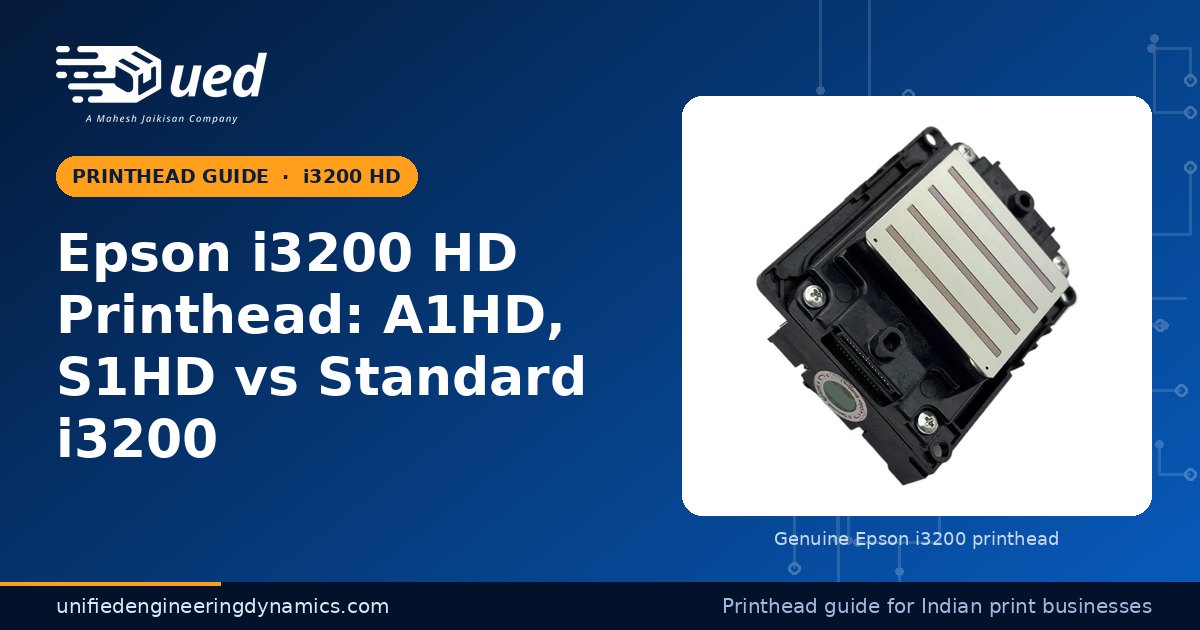
Table of Contents
What Makes a Head “HD”
The standard i3200 is sometimes written as I3200(4) because it supports four ink channels. Each colour uses two adjacent rows of 400 nozzles, giving 600 npi per colour. The HD version, written I3200(8), gives each of the eight nozzle rows its own ink supply channel. This one change opens two possibilities:
- More colours: up to eight different inks on one head, such as CMYK plus light colours, white or varnish.
- Higher resolution: when two colours share the head, each colour can use four rows, giving 1,200 npi per colour.
Epson describes the benefit as more freedom in colour configuration and improved placement accuracy by arranging the same colours next to each other.
i3200 HD Printhead vs Standard i3200
| Feature | Standard i3200 (A1, E1, U1) | i3200 HD (A1HD, S1HD) |
|---|---|---|
| Nozzles | 3,200 (8 rows) | 3,200 (8 rows) |
| Ink supply channels | 4 | 8 |
| Maximum colours per head | 4 | 8 |
| Maximum resolution per colour | 600 npi (2 rows) | 1,200 npi (4 rows, two-colour use) |
| Print width | 33.8 mm | 33.8 mm |
| Ink versions | A1 water, E1 eco-solvent, U1 UV | A1HD water; S1HD UV, eco-solvent, oil, solvent |
| Typical use | Four-colour production printers | Multi-colour or high-definition compact machines, single-pass systems |
For a full comparison of the standard versions, read our guide to the Epson i3200 A1 vs U1 vs E1 printheads.
A1HD vs S1HD
Epson offers two HD versions. The ink chemistry still decides which one you need.
| Specification | I3200(8)-A1HD | I3200(8)-S1HD |
|---|---|---|
| Ink type | Aqueous (water-based) | UV, eco-solvent, oil and solvent |
| Viscosity range (reference) | 2.2–3.8 mPa·s | 6.0–7.0 mPa·s |
| Binary droplet | 6 pl at 43.2 kHz | 5 pl at 43.2 kHz |
| 3-level grayscale | 6.3 and 12.3 pl at 21.6 kHz | 6 and 12.5 pl at 21.6 kHz |
| 4-level grayscale | 3.8, 6.1, 9.4 pl at 21.6 kHz | 3.5, 6.3, 12 pl at 12 kHz |
| Weight (reference) | 78 g | 82 g |
| Ink recirculation | Not available | Not available |
| Internal heater | Not available | Not available |
Two practical points stand out. First, the S1HD is specified for thicker ink, so machines using it must control ink temperature to stay within range. Second, neither HD version has internal recirculation or an internal heater, so white ink circulation and ink warming must be handled by the machine’s ink system.
Where the i3200 HD Printhead Makes Sense
HD heads are not an automatic upgrade. They suit particular machine designs:
- Compact multi-colour printers: eight channels let a small machine run CMYK plus extra colours, white or varnish with fewer heads.
- High-definition small-format work: labels, packaging proofs, fine text and detailed graphics benefit from 1,200 npi in two-colour layouts.
- Single-pass systems: Epson highlights single-pass printing for packaging and commercial work, where placement accuracy and resolution in one pass matter.
- UV machines with white and varnish: putting more channels on fewer heads can simplify carriage design.
Where a Standard i3200 Is Better
- Four-colour wide-format eco-solvent, UV roll-to-roll and DTF printers that already achieve their quality targets at 600 npi.
- Machines where speed per colour matters more than extra colours on each head.
- Shops wanting the widest choice of replacement heads, boards and technician experience.
- Buyers who want simpler maintenance and colour management.
Most vinyl, flex, backlit, sublimation and DTF work in Indian print shops is well served by standard heads. The extra capability of HD heads only pays when the machine design actually uses it.
Speed and Colour Trade-Offs
Total nozzles are the same, so spreading eight colours across one head means fewer nozzles per colour. A head running eight colours has one row, or 400 nozzles, per colour. A head running two colours has four rows, or 1,600 nozzles, per colour. Machine makers choose configurations to balance resolution, colour count and speed.
| Colours on one HD head | Rows per colour | Nozzles per colour | Effect |
|---|---|---|---|
| 2 | 4 | 1,600 | Highest resolution per colour (1,200 npi) |
| 4 | 2 | 800 | Similar to a standard i3200 |
| 8 | 1 | 400 | Most colours, lowest nozzles per colour |
Boards, Software and Compatibility
HD heads need controller boards, head boards and software that support eight independent channels and the specific HD waveforms. They are not drop-in replacements for standard i3200 heads in machines designed for four channels, even though the body looks similar.
- Confirm the board maker supports the exact HD model.
- Check the ink path: eight channels need eight supply lines and suitable dampers.
- Confirm the RIP and printer software can map colours to all channels.
- Set voltage and head data as the supplier instructs.
- Build new colour profiles for the configuration.
Our articles on fire board compatibility and head voltage settings cover the electrical side of any head change.
How to Identify an i3200 HD Printhead
Because the bodies are so similar, identify the head from its label and documentation rather than appearance.
- Look for “I3200(8)” and “A1HD” or “S1HD” on the head label or box.
- Count the ink inlets: an eight-channel head needs eight ink connections.
- Check the machine specification and the head type in the printer software.
- Ask the supplier to confirm the exact model and ink compatibility in writing.
Be careful with listings that use “HD” loosely. Some sellers call the S1HD a “U1HD” because it is commonly used with UV ink. That is acceptable shorthand, but confirm that the head you receive matches Epson’s naming.
Buying an HD Machine: What to Check
- Ask how many colours each head runs and at what resolution.
- Request sample prints at the resolution you will actually use.
- Confirm replacement head price and local availability.
- Ask whether technicians in your area have experience with HD configurations.
- Check white ink and varnish handling, since the head has no internal recirculation.
- Confirm the warranty terms for heads and boards.
For buying advice that applies to any head, see our guide to buying a genuine printhead in India and avoiding fakes.
Caring for an i3200 HD Printhead
HD heads need the same care as standard heads, with a few added points. With eight channels, a clog in one row affects one colour completely, so nozzle checks must cover every channel. Capping stations must seal all rows evenly, and wiping must be gentle and consistent across the nozzle plate.
- Run a full nozzle check covering all eight channels at the start of each shift.
- Keep caps and wipers clean and replace them on schedule.
- Manage white ink settling with machine-level circulation or agitation.
- Use only cleaning fluid matched to the ink.
- Keep ink temperature stable on S1HD machines running UV ink.
Cost Considerations
HD heads are usually priced above standard i3200 heads, and HD machines need more ink lines, dampers and channels. Before paying extra, confirm that you will actually use the extra colours or resolution. For standard four-colour production, a conventional i3200 machine often gives better value. Our guide to printhead running cost and lifespan helps compare total cost rather than head price alone.
Single-Pass and Industrial Uses
Epson highlights single-pass printing as a key application for the I3200(8) series. In single-pass systems, a fixed array of heads prints the full width while the material moves underneath once, as in label, packaging and transactional printing lines. Placement accuracy and resolution in one pass are critical, so the eight-channel design with closely arranged colours is valuable. These systems are typically built by integrators rather than bought off the shelf by small print shops, but they show where the HD head delivers most benefit.
- Narrow-web label printing and coding.
- Packaging decoration and short-run carton printing.
- Transactional and variable data printing.
- Specialised industrial decoration lines.
Colour Management on HD Machines
More colours give a wider gamut and smoother tones, but they also make colour management more demanding. Each extra ink channel needs to be linearised and profiled. Light colours, orange, green or other spot inks must be handled correctly by the RIP. Shops moving to multi-colour HD machines should allow time for profiling and staff training. Poorly profiled extra colours can make results worse rather than better.
| Configuration | Colour management effort |
|---|---|
| CMYK | Standard profiling |
| CMYK plus white | Standard profiling plus white layer settings |
| CMYK plus light colours | Additional linearisation and ink limits |
| Extended gamut (orange, green, etc.) | Advanced profiling and RIP support |
Service and Support in India
Standard i3200 heads are widely used across Indian eco-solvent, UV and DTF printers, so technicians, boards and spare parts are easy to find. HD heads are newer and less common, so local experience may be limited. Before buying an HD machine, confirm that the supplier provides trained service, keeps spare heads and boards in stock and can support colour profiling. Fast local support often matters more than the technical advantages of a head.
Example: When an HD Head Pays Off
Consider a label and packaging printer producing short runs with fine text, barcodes and brand colours. A compact machine using HD heads running two colours per head at 1,200 npi can deliver sharper small text, while extra channels allow white and varnish without adding heads. Compare this with a sign shop printing vinyl and flex for shopfronts. Viewing distances are larger, four colours are enough, and speed per square metre matters more. For the sign shop, a standard i3200-E1 machine is the better choice.
Upgrade Questions to Ask
- Will the HD configuration improve the jobs I actually print?
- How many colours will each head run, and at what resolution?
- What is the cost difference between the HD and standard version of the machine?
- Are replacement HD heads available locally, and at what price?
- Does the RIP fully support the extra channels?
- Who will build and maintain colour profiles?
Clear answers to these questions prevent paying for capabilities that will not be used.
Storage and Handling
Like all piezo heads, HD heads must be stored and handled carefully. Keep new heads sealed in their original packaging in a cool, dry place until installation. Handle them by the body, never touching the nozzle plate or connectors. Use static protection when fitting them, and follow the supplier’s instructions for priming. If a machine will be idle for a long time, follow the manufacturer’s storage procedure rather than leaving heads uncapped.
HD Heads in UV Printing
UV machines benefit most from flexible channel layouts. A typical UV printer needs CMYK, white and often varnish. With standard heads, a machine might use one head for CMYK, one for white and one for varnish. With HD heads, more channels fit on fewer heads, which can simplify the carriage and reduce the number of boards and cables. However, white and varnish channels then share a head with other colours, so nozzles per channel fall. Manufacturers balance these factors differently, so compare actual layouts and sample prints rather than assuming fewer heads is always better.
| Layout approach | Advantages | Trade-offs |
|---|---|---|
| Standard heads, one function per head | More nozzles per channel, simpler profiles | More heads, boards and cables |
| HD heads, mixed channels | Fewer heads, compact carriage | Fewer nozzles per channel, more complex setup |
HD Heads in Water-Based Printing
The A1HD suits water-based applications that need extra colours or very fine detail, such as specialised textile sampling, decorative printing and high-quality proofs. Its specified viscosity range is lower than the standard A1, so ink selection must follow the machine maker’s approval list. Using an ink outside the specified range affects drop formation and reliability, even if the ink is water-based.
Common Misunderstandings
- “HD means more nozzles”: no, it has the same 3,200 nozzles; the difference is in ink channels and configuration.
- “HD is always sharper”: only when configured for fewer colours per head.
- “HD fits any i3200 machine”: it needs eight-channel boards, ink lines and software.
- “U1HD is a separate Epson model”: sellers often use this name for the UV-capable S1HD; confirm the exact model.
Making the Final Decision
List the jobs you print most often, the viewing distance, the colours you need and your daily volume. If your work is mainly four-colour signage, DTF or sublimation, a standard head is the better choice. If you need extra colours, white and varnish on a compact carriage, or very fine detail in small formats, an HD machine may justify its higher cost. Ask for sample prints of your own jobs from both types before deciding.
Further reading: the HD head is made using micro-fabrication techniques; see Wikipedia’s overview of microelectromechanical systems for background.
Key Takeaways
- The i3200 HD is Epson’s I3200(8) series: A1HD for water-based ink and S1HD for UV, eco-solvent, oil and solvent inks.
- It keeps 3,200 nozzles but adds eight separate ink channels.
- It supports up to eight colours or 1,200 npi per colour in two-colour use.
- It needs boards, ink systems and software designed for eight channels.
- Standard i3200 heads remain the better value for most four-colour production printers.
Our Verdict
The i3200 HD printhead is a specialist tool, not a general upgrade. Choose it when your machine design uses extra colours, white and varnish on fewer heads, or very fine detail at 1,200 npi. For mainstream eco-solvent, UV roll-to-roll, DTF and sublimation production, the standard i3200-A1, E1 or U1 remains the practical, well-supported choice.
Frequently Asked Questions
What does HD mean on an Epson i3200 printhead?
HD refers to the I3200(8) series, which has eight separate ink channels. It allows up to eight colours per head or up to 1,200 nozzles per inch when running two colours.
What is the difference between i3200 A1HD and S1HD?
The A1HD is for water-based inks. The S1HD is for UV, eco-solvent, oil and solvent inks and is specified for a thicker ink viscosity range.
Is U1HD the same as S1HD?
Many sellers use “U1HD” for the HD head used with UV ink. Epson’s own datasheet names the solvent and UV-capable HD version the S1HD, so confirm the exact model with your supplier.
Can I fit an HD head in place of a standard i3200?
Not as a simple swap. HD heads need boards, ink lines and software that support eight channels. Check with your machine or board supplier before attempting it.
Does an HD head print faster than a standard i3200?
Not necessarily. Both have 3,200 nozzles. The HD head gains flexibility and resolution, but nozzles per colour fall when more colours are placed on one head.
Do HD heads have ink recirculation for white ink?
According to Epson’s datasheet, the I3200(8) series has no internal recirculation or heater, so white ink circulation and ink warming must be handled by the machine.
Is an HD machine worth it for vinyl and flex printing?
Usually not. Standard four-colour i3200-E1 machines handle vinyl and flex production well at lower cost and with wider service support.
