



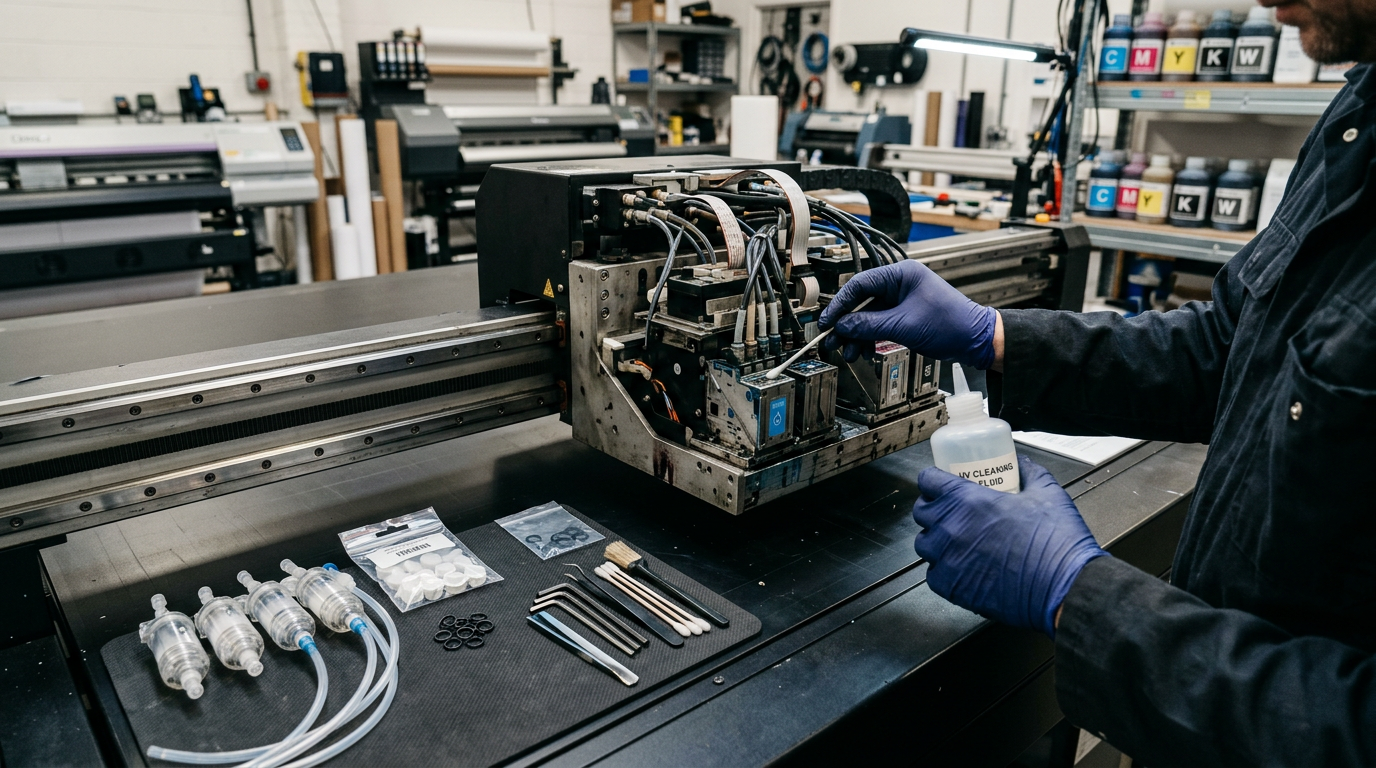
UV printers are wonderfully paradoxical machines: utterly dependable when disciplined, theatrically moody when neglected. The good news buried in that sentence — roughly 80% of UV printer failures trace to six habits, not broken parts. Shops that print daily, circulate white ink, cap properly, and keep dust out rarely meet an engineer. Shops that don’t, fund their dealer’s car.
This guide maps the 12 problems that actually occur on Indian UV flatbeds and UV DTF machines: what each looks like, what it usually means, the fix order from free to expensive, and the maintenance calendar that prevents most of them. Bookmark it — the day you need it, you’ll need it at 9 PM with a morning deadline.
The UV-Specific Failure Landscape (Why UV Is Its Own Animal)
Three UV-only physics facts explain most of this list: the ink cures by light, not air (so curing failures masquerade as ink failures); white ink pigment settles fast (so channel starvation mimics head death); and prints sit on top of substrates mechanically (so prep failures look like ink-quality failures). Diagnose along those three axes before touching anything else.
Problem 1–3: The Print Quality Trio
1. Banding / Lines Across Prints
Looks like: fine horizontal striping, missing density bands. Usual causes (in order): clogged nozzles from idle time; wrong pass-count/print-mode for the media height; encoder strip dirty; rails dry. Fix order: nozzle test → 1–2 cleaning cycles → recheck → clean encoder strip with isopropyl → check media lies flat (warp causes variable head gap = fake banding) → only then suspect the head. Never let cleaning cycles run past three without improvement — after that, you’re pumping ₹200 of ink into the waste pad per cycle for nothing.
2. Colours Wrong vs Screen
Looks like: prints dull, shifted, completely off-brand. Causes: no ICC profile for this exact media/ink/machine; RIP colour settings reset after update; ink brands changed mid-game; varnish layer over colour muting saturation (design expectation issue, not fault). Fix: confirm you’re on the supplier’s profile for THIS substrate; linearize after any ink change; print the control strip and compare to last week’s; manage customer expectations about RGB screens vs physical ink upfront.
3. Blurry/Double Edges
Causes: head-height too high for the object (dots spread mid-flight); carriage speed too hot for detail mode; media/object vibrating (vacuum zone off); registration drift between colour and white passes. Fix: set head gap by the book (1.5–2.5mm typical); drop to quality mode for premium jobs; re-run the machine’s bidirectional alignment calibration after any transport or head work.
Problem 4–6: The Curing Cluster (UV’s Signature Failures)
4. Prints Tacky / Scratch Off Hours Later
The classic. Causes: LED lamp dying (output fades before failure — test with a UV power meter or the thumb-nail scratch test weekly); print speed exceeded cure capacity at full white coverage; ink not matched to lamp wavelength (mercury ink under LED lamp NEVER fully cures); ink layer too thick in one pass. Fix: verify lamp health first, slow pass count up for dense white jobs, confirm ink-lamp certification, split heavy white into two passes.
5. Overcured, Cracking, or Yellowing Prints
Less common, still real: lamp parked too long over one spot (job paused mid-print between passes), or brittle rigid ink on a flexing substrate. Fix: resume-printing discipline, and flexible ink for anything that bends. Yellowing whites usually mean old white stock — check bottle dates.
6. Strong Smell / Oily Surface Film
Undercured monomer smell: cure settings too fast, lamp weak, or ink-lamp mismatch. If the surface feels greasy hours later, that’s undercure — treat as Problem 4, never ship it, and ventilate the room meanwhile.
Problem 7–9: White Ink Warfare
7. White Channel Stops Printing (Partial or Total)
The #1 UV support call. Titanium dioxide settles overnight; a static white channel starves by morning. Fix order: verify circulation pump actually running (listen/feel the tubes); prime the white channel per manual; gentle manual inverse-agitation of the tank; wet-cap 20–30 min then 1 clean cycle; if starvation persisted >2 weeks, new white dampers often revive “dead” channels for ₹300 instead of ₹55,000 heads. Prevention: circulation 24/7, daily white nozzle test, never skip weekends uncapped.
8. White Looks Grey/Patchy
Undercured white base (see Problem 4), diluted old stock, or white-ink percentage turned down in RIP to “save ink” (the setting that ruins premium jobs). Check bottle date, restore 100% white density, cure-test, reprint.
9. White/Colour Misregistration (Halo Effect)
Coloured halos around white areas: layers printed in separate passes with carriage drift, or design’s white layer not choked (contracted) by 0.2–0.5 px under the colour layer. Fix: choke layers in RIP (one checkbox), run bidirectional calibration, prefer single-pass white+colour head configs for registration-critical work.
Problem 10–12: Mechanical & System Failures
10. Head Strike Damage (The Insurance Claim)
Object edge/curl meets moving heads: scratches, instant banding, sometimes face-plate destruction. Prevention > cure here by 100×: anti-collision sensors enabled always, Z-height measured per object (NEVER estimated), warped boards vacuum-checked, jigs taped flat. If it happens: stop, photograph, nozzle test to assess, swab face with correct flush, and call the engineer with the pictures — honesty about strikes saves diagnostic time.
11. Vacuum Bed Won’t Hold / Media Creeps
Weak pump, clogged bed holes, or zones left open leaking suction. Fix: clean bed holes with a pin-wire (monthly), close unused zones, check pump filter, and re-tape media edges on stubborn boards. A creeping sheet mid-print ruins registration — stop at the first sign rather than finishing a wasted print.
12. Communication / RIP Failures at Midnight
Jobs stopping mid-print, machine offline, layer files failing: cheap USB cables, PC sleep settings, and underpowered RIP computers cause 90% of these. Fix kit: quality short USB cable, Windows power settings locked to “never sleep,” RIP PC with 16GB+ RAM and SSD. Keep a full spare cable set — at midnight, it’s the only fix that exists.
The Master Diagnostic Table (Bookmark This)
| Symptom | Most Likely Culprit | First Move | Usual Cost to Fix |
|---|---|---|---|
| Banding | Clogged nozzles / dirty encoder | Nozzle test + max 2 cleans | ₹0 – 500 |
| Tacky print | Lamp weak / ink mismatch | Thumb-scratch cure test; slow passes | ₹0 – 18,000 (lamp) |
| No white output | Settled white ink / starved channel | Check circulation; prime; wet-cap | ₹0 – 1,500 |
| Colour shift | Missing ICC / ink change | Control strip vs last week | ₹0 |
| Blurry edges | Head gap / calibration drift | Measure Z-gap; re-run alignment | ₹0 |
| Halos around white | Un-choked white layer | RIP choke setting + calibration | ₹0 |
| Random banding after strike | Face-plate scratch | Nozzle map; assess; engineer | ₹0 – head price |
| Media curling mid-print | Vacuum leak / clogged bed | Clean bed holes; check zones | ₹0 – 3,000 |
| Mid-job stop | USB/PC sleep/weak RIP PC | Cable + power settings + RAM | ₹250 – 55,000 |
The UV Maintenance Calendar (Indian Conditions)
| Frequency | Task |
|---|---|
| Daily | Nozzle test all channels (photo-logged); wipe capping station; verify white circulation; 10-min warm-up prints |
| Weekly | Wet-cap heads; clean encoder strip; dust machine interiors (power OFF); check lamp surfaces |
| Monthly | Vacuum-bed holes cleaned; dampers inspected; rail lube per manual; control-strip comparison to baseline |
| Quarterly | Full flush-line inspection; chiller coolant check (Ricoh machines); lamp output test; professional service visit |
| Seasonally | Pre-festive-season full service before Diwali/wedding rushes; monsoon humidity management (media storage, room dehumidifying) |
The ₹6,000 Emergency Kit
Every UV shop’s shelf should hold: spare dampers (₹150–400 each), cap tops (₹800–1,500), wiper blades (₹200–500), manufacturer flush solution (₹900–1,500), lint-free swabs + nitrile gloves, spare USB cable, fuses, and the engineer’s number laminated to the machine. These ₹6,000 of rubber and plastic routinely prevent ₹60,000 of downtime.
The Prevention System: Why the Best Troubleshooting Is a Calendar
Breakdown rates between identical machines differ 10× between shops — the variance is almost entirely process, not luck. The layered system that mature UV shops run:
- The 15-minute morning ritual: nozzle test (photographed) → capping/wiper wipe → white circulation audit → first small print before the day’s big jobs. Fifteen minutes that intercept 80% of emergencies while they’re still free.
- The maintenance logbook: page-per-week — nozzle photos, clean counts, part changes, anomalies. Patterns emerge on paper that memory always misses; and at resale, this book IS money.
- The parts schedule, not parts panic: dampers and cappings replaced at 6–9 month SCHEDULE (~₹2,000) instead of at failure during deadline week (~₹60,000 consequences).
- The deep-service appointment: booked for the last week of September, annual, immovable — so the festive Everest months run on a verified machine, not a hopeful one.
Service Contracts vs Pay-Per-Visit: The UV Math
| Model | Annual Cost (Typical) | Genuine Pros | The Catch |
|---|---|---|---|
| AMC with assembler (2–4 visits + remote priority) | ₹20,000 – 45,000 | Priority queue in peak season; scheduled preventive visits; parts discounts often bundled | Read inclusions exhaustively — heads/lamps are never covered; verify “onsite” vs “at-works” |
| Pay-per-visit | ₹2,000 – 5,000/visit + travel | Cheapest for disciplined shops near service hubs (typically 3–6 visits/yr) | You queue behind AMC customers exactly when everyone breaks: pre-Diwali |
| Trained-DIY + annual pro service | ~₹8,000 – 15,000 total | The sweet spot for single-machine shops with an owner who follows SOPs | Requires actually doing the daily rituals, not aspiring to them |
Decision rule: machines earning ₹1.5L+/month in B2B deadline work should hold AMCs — the priority queue IS the product. Hobby-to-side-income machines survive beautifully on trained-DIY + annual service.
The Midnight Emergency SOP (Deadline Rescue Protocol)
Machine faults choose 11 PM before 9 AM deliveries with supernatural consistency. The protocol that saves the order:
- Stop — don’t cycle-power 5 times in panic. Photograph the nozzle test and the symptom print FIRST (evidence for you and the engineer both).
- Run the cheapest-reversible ladder: environment check (temperature/power dip?) → single clean + retest → dampers/cap visual → cable reseat → RIP restart with KNOWN-GOOD file (not the client file — isolate file vs machine).
- Know your three hard stops: head strike noises, ink smell of electrical origin, or anything involving the main power supply = stop, preserve evidence, engineer call. Midnight heroics on those three convert ₹5,000 problems to ₹60,000 ones.
- The backup ladder for the morning deadline: can the job run in a simpler mode (single-pass quality, no varnish layer)? Can the white base print tonight and colour at dawn? Salvage-partial strategies have saved more client relationships than full-fix strategies at 1 AM.
- Morning call script to the engineer: lead with your photos + log + what you already tried — engineers triage evidence-ready callers faster, because their diagnostic first hour is already done.
Seasonal Problem Patterns (India-Specific)
| Season | Characteristic Failures | Pre-emptive Moves |
|---|---|---|
| Summer (Apr–Jun) | Overheat carriage alarms; ink viscosity shifts; power-purge events | Room at 26–30°C; chiller checks on Ricoh builds; stabilizer verified before April |
| Monsoon (Jul–Sep) | Humidity flickers substrates; condensation near chillers; corroding connectors | Substrate storage sealed; connector inspection monthly; dehumidifier if room insists on 80%+ |
| Festive peak (Oct–Nov) | Fatigue failures under 12-hr duty: pumps, lamp drivers, worn rails speak up | September service done; spare kit topped up; no experiments with new ink/film NOW |
| Winter (Dec–Jan) | Cold-viscosity dropouts at startup | 15-min warm-up ritual; room-temp stored ink only |
When to Replace vs Repair: The Machine-Level Decision
Eventually every owner faces it: board failure on year-5 machine, head-pair cost approaching machine value, bed mechanics tired. The honest decision frame: repair when the machine’s post-repair life economics beat its replacement EMI — repair bills under ~35% of current-new-equivalent price usually clear that bar; bills above 50–60% rarely do, because the rest of the machine continues aging around the new part. And the resale-honesty rule: machines with documented logs and clean recent strike-free history command the top of the used market — the paper trail you kept all these years finally collects its dividend right when you upgrade.
The Early-Warning Dashboard: Signals Before Failures
| Signal | What It’s Testing | The Habit That Catches It |
|---|---|---|
| Nozzle drift widening week-on-week | Early head wear / ink supply developing issue | Dated nozzle photos compared monthly |
| Clean-cycle count creeping up | System strain developing (dust/idle/ink) | Weekly clean-count logged; investigate trend, not instance |
| Waste-pad fill rate accelerating | Over-cleaning culture forming | Quarterly pad check matched to clean logs |
| Slight colour repositioning between passes | Encoder strip film build-up beginning | Weekly encoder wipe scheduled |
| First-print-of-day quality dips | Overnight capping weakness growing | Cap-station rubber weekly inspection |
| Lamp output meter trending down | LED aging curve progressing | Quarterly lamp test with the UV meter; budget the lamp BEFORE the prints announce it |
| Noise/hum changes in carriage travel | Rail wear / dry spots | Monthly rail inspection-clean-lube per manual |
Every one of these signals is free to observe and predictively priced at ₹0. The versions discovered BY CUSTOMERS, in shipped work, cost 100× more — in refunds, reputation, and rush-repair prices.
Board & Electrical Failures: The Serious-Tier Guide
When the failure crosses from mechanical/ink into electronic, the decision discipline changes completely:
- Symptoms mapping: dead boot sequences, driver-burnout smells, channels electrically absent even with known-good heads — these live on boards (main/head-driver/power), not in heads.
- The no-swap rule: never test-swap a suspect board with a head attached — one shorted driver output kills both. Board-and-head suspected together = bench diagnosis by the engineer, not garage experiments.
- Repair vs replace on boards: main board repairs (₹3,000–9,000 typical) make sense on healthy machines; head-driver damage history repeating = address the SUPPLY CAUSE (stabilizer/earthing) or the repairs return annually like festivals.
- Documentation habit: photograph board markings/revisions on purchase day — correct-revision replacements ordered months later become one-day fixes instead of week-long part hunts.
RIP & Software Problems (The Invisible 20% of “Machine Failures”)
| Symptom | Likely Software Cause | Fix |
|---|---|---|
| Job stops mid-print randomly | PC sleep-USB suspends; insufficient RAM paging | Power settings locked; 16–32GB RAM; SSD |
| Colours suddenly wrong after “update” | Profile table regenerated/reset | Baseline profiles backed up — restore, re-linearize |
| White layer missing in output | Channel mapping lost after file/RIP change | Template files per product locked; no ad-hoc channel edits |
| Dongle not detected | USB power management / port failures | Dedicated port, power management off, spare extension kept |
| “It printed fine yesterday” syndrome | Windows updates overnight altering drivers/ports | Update-freeze discipline on the RIP PC; updates scheduled quarterly, manually |
Building Your Service Network (Before You Need It)
- The assembler/engineer relationship: purchase day onward, you’re buying their responsiveness — evaluate service teams during the buying process as rigorously as machines.
- The local technician bench: in every tier-1/tier-2 city, independent UV/CNC technicians exist (found via owner WhatsApp groups and supplier references). A known local tech = response in hours vs days.
- The owner communities: machine-model WhatsApp/Telegram groups hold astonishing peer expertise — the 11 PM “what does this error mean” answered by a fellow owner saves the night annually.
- The spares pipeline: two sources minimum for every recurring part (assembler + one independent channel); parts stock-outs during festive weeks are the industry’s most self-inflicted wound.
Warranty vs Self-Repair: The Decision Lines
| Situation | Route | Why |
|---|---|---|
| Daily maintenance rituals, dampers/wipers/cap-tops | ✅ Self — always | Your machine; your rhythm; zero dependency |
| Software/profile issues within warranty | Remote support first | Free, fast, and preserves goodwill credits |
| Electronics/board issues in warranty period | ✅ Official channel — documented | Warranty value only exists if exercised officially |
| Post-warranty mechanical repairs | Situational: local tech for standard work; engineer for complex | Cost/speed balance shifts post-warranty, competence decides |
| Head replacement (any era) | Guided-official first time; supervised-self afterwards | The component justifies zero learning-curve risk |
The Complete Cleaning Chemistry Guide
| Fluid/Tool | Use | Never Use For |
|---|---|---|
| Manufacturer UV flush solution | Wet-capping, line flushes, deep cleans | Daily wipe-downs (wasteful + unnecessary) |
| Isopropyl alcohol (90%+) | Encoder strips, machine surfaces, glass beds | Direct head-face contact (degrades plate coatings) |
| Distilled water-moistened lint-free swabs | Specific per-manual gentle face care ONLY as instructed | Any forceful wiping, any direction-scrubbing |
| Tissue/cloth improvisations | — | NEVER on heads (fibre = permanent clog introducer) |
| Generic solvent cleaners (MEK, thinners) | — | Anywhere near the ink path (catastrophic chemistry inside dampers/tubes) |
Transport & Relocation SOP (The Silent Head-Killer Nobody Budgets For)
Machine relocations (shop shifts, expo demos) kill more heads than age does. The disciplined sequence: ink system secured per manual (drain-to-safe or full-seal per your assembler’s guidance — different builds differ); heads capped and carriage locked with the transport restraint the machine CAME with (you kept those brackets, right?); gantry cushioned; vertical-orientation transport (never lay-gantry-flat improvisations); and full re-leveled + recalibrated commissioning at destination including Z-sensor verification. Budget one engineer visit for the destination commissioning — relocation is precisely the wrong day to discover self-sufficiency ambitions.
Long-Idle Shutdown Protocol (>7 Days)
- Full head wet-cap per manual; circulation status for white confirmed per machine design.
- Ink tanks filled to recommended idle levels; bottles sealed and dark-stored.
- Chillers drained/set per manufacturer (Ricoh builds); power isolation of lamps zone.
- Machine covered (breathable cover — not polyethylene that traps humidity).
- RETURN protocol: power-on → full warm-up → nozzle test → 2 cleans max if gaps → two small test prints → production resumption logged. Plan one recovery hour; budget a morning honestly.
Firmware & Software Updates: The Conservative’s Rulebook
Industrial machine updates follow opposite logic to phones: if the machine runs production stably, updates are risk, not improvement. Update only when: a specific bug blocking YOUR workflow is fixed in the release notes; or the manufacturer’s advisory explicitly covers your symptom. Before ANY update: configurations/profiles exported, RIP baseline saved, machine-schedule quiet week chosen, supplier on notice that you’re updating (so support context exists if it goes wrong). The enterprises that update emergencylessly during peak season create the stories the rest of the industry tells at trade shows.
The Quarterly Machine Health Scorecard
| Check (Quarterly, 2 Hours) | Pass Standard |
|---|---|
| Nozzle-map trend vs 3-month-old reference photos | Stable channel integrity; no new dead-zone development |
| Lamp output measurement (UV meter) | Within manufacturer tolerance; budget planned if trending down |
| Chiller/cooling-system audit | Fluid levels, flow rates, temp logs normal |
| Linear rail & motion inspection | Smooth travel, lube status per schedule, no wear glitter |
| White-system hygiene audit (tubes/tanks/sight glass) | No settled pigment evidence in lines |
| Power chain test (stabilizer output, earthing integrity) | Voltage window held under load test |
| Waste-system review (pads/bottles/logs) | Fill-rates consistent with clean-cycle discipline |
| Spares shelf completeness vs reorder levels | Kit complete; one-levels reordered that same day |
Print this scorecard; laminate it near the machine; date-and-initial each quarter. It’s simultaneously your prevention system, your service-contract negotiation evidence, and your resale-value documentation — three functions, two hours, quarterly.
Emergency Contacts Architecture (Set Up Tonight)
Finally: the machine room wall should hold a laminated card with — your assembler’s service line; your local independent technician’s number; the WhatsApp owner-group link; the spares supplier; and the chiller/electrician contacts. Disasters get managed by the people you can reach; the card converts morning-deadline panic into one organized phone call. It’s the cheapest maintenance investment in this entire guide, and the one absent from exactly the machines that appear in cautionary stories.
The Symptom Vocabulary: Talking to Engineers Like a Professional
Half of diagnostic speed comes from precise vocabulary. The terms that make engineers take you seriously (and save their paid first-day-of-guessing):
- “Missing channels on the white since Tuesday” — beats “white chal rahi thi kal tak.”
- “Deflection pattern on nozzle map, third channel group” — beats “print kharab aa raha hai.”
- “Starvation after 200 mm into long prints” (recoverable mid-print dropouts = supply-side evidence) — beats “beech mein band ho jaati hai.”
- “Afternoon heat correlation, alarm code E-__” (overheat diagnostic value) — beats “garmi mein problem hoti hai.”
- “Post-strike banding localized to one swath” — full honesty about strikes REACHES the correct firmware-reset vs hardware-repair answer fastest.
Evidence packages make this even better: dated nozzle photos, the failing job’s file, machine counter shots. An engineer arriving on evidence-first reporting starts repairing at minute one — billing hours are diagnostic hours unless you do the diagnosis together first.
The Machine Health Diary: Template Per Week
One page per week, 5 minutes per day to maintain:
| Daily Rows (Mon–Sat) | What to Note |
|---|---|
| Nozzle test reference photo ID | “as yesterday / degrading / recovering” + photo filename |
| Clean cycles run | count; investigate if >2 consecutive days climbing |
| Jobs produced / sq ft equivalent | workload picture for wear-context |
| Consumables noticed low | inventories flagged for reorder before they run out |
| Anomalies (sounds, smells, alarms) | described same-day, while it was fresh |
| Weekly summary line | “machine = healthy / watch item: ___” |
At resale, at warranty claims, at engineer diagnosis, this diary performs miracles that memory cannot even imitate. Five minutes daily; compounding value for years.
The Used-Machine Inspection Day Plan (Extended)
- Before travel: photo checklist sent to seller (nozzle test from today, counter screens, tube-condition photos). Refusal patterns here tell their own story immediately.
- Hour 1 — cold inspection: bed flatness by straightedge; gantry/rail wear-glitter check; white-system sight tubes; dampers’ colour-age; hidden-corrosion around the capping station; lamp glass condition.
- Hour 2 — live production: YOUR files, their machine, their normal modes — dense white-on-black acrylic; fine detail pass; long-edge gradient. All three, no substitutions accepted.
- Hour 3 — the conversation evidence: ink brands used (bottle labels photographed), service history records or lack thereof, reason-for-sale cross-examined, accessories exactly as included, transportation responsibility defined.
- Decision discipline: the counter-offer math — Price + preventive-parts + commissioning risk + transport should still sit 30–35% below equivalent new. If seller math rejects that, walk politely — new-with-warranty is worth more than most sellers of used machines remember.
False Economies: Save-Money Moves That Cost Most
- The “compatible” spare lamp at 40% of genuine: UV output spectra variations undercure inks silently; rework costs repay the difference within weeks.
- Ink-system parts from unknown generics: dampers₹200 savings × head₹60,000 risk is arithmetic in favour of genuine pathways.
- Skipping the UPS maintenance: exhausted batteries give exactly one warning: the machine dying mid-job on a power sag they no longer absorb.
- Postponing the encoder/rail care until quality complaints: ₹0-prevention replaced by ₹4,000-service calls, every time, on schedule.
- The trial-by-deadline: debut-materials/new-ink trials scheduled against customer commitments. Test days exist for tests; commitments deserve only proven configurations.
The Culture Line (Why All of This Actually Works)
Strip this troubleshooting guide of every table and what remains is one culture: machines maintained by calendar outperform machines maintained by crisis — permanently. Shops running rituals photograph nozzles daily, replace ₹300 dampers on schedule, season their service before festive peaks, and describe failures to engineers in precise vocabulary with photo evidence attached. Shops running vibes meet the same machine physics without the evidence, the spares shelf, or the savings — and learn the curriculum at penalty rates, often publicly, usually during the busiest week of the year. Neither group owns different machines. Owning maintenance culture is the actual ownership; the machine itself merely follows.
The One-Minute Morning Recap (Laminate This Beside the Machine)
- Nozzle test first, production after. The 30-second photograph that owns the day.
- White circulation verified by eyes, not assumption. Pumps hum, sight tubes flow.
- Z-height measured for the day’s first object. Estimates strike; calipers don’t.
- Vacuum zones + media flatness before long runs. A warp-check is cheaper than a carriage bill.
- Encoder glance: clean strip, clean travels. Registration ghosts live there.
- Waste bottle level logged. Yesterday’s discipline, visible.
- First job = a small warm-up print. Machine mornings mirror human ones.
Sixty seconds each morning that turn this entire guide from bookmark into museum piece — which is where troubleshooters deserve to stay.
Frequently Asked Questions (FAQs)
Why is my UV printer not printing white?
Almost always settled white pigment starving the channel. Verify circulation pump operation, prime the white channel, gently agitate the tank (never shake), wet-cap, then one clean cycle. Prevention: 24/7 circulation + daily white nozzle tests.
Why do my UV prints scratch off?
Undercure (weak lamp, too-fast passes, or ink-lamp wavelength mismatch) or wrong substrate prep (no primer on glass/metal). Test cure with a thumb-scratch 1 minute after print; test adhesion with the tape test.
How often should I clean UV printheads?
Daily nozzle checks, cleaning cycles ONLY when tests show problems (max 2 in a row), weekly wet-capping. Over-cleaning wastes ink and stresses heads without fixing anything.
What kills UV printheads fastest?
In order: head strikes from unmeasured object heights, white-ink neglect, cheap mismatched ink, and dry-firing from empty lines. All four are operator-preventable.
UV machine not turning on / boards dead?
Check the stabilizer/UPS first — Indian voltage events kill boards through unprotected lines. A ₹30,000 stabilizer outlives three ₹40,000 boards.
Final Verdict
UV printers reward boring discipline extravagantly: daily nozzle photos, white circulation, measured Z-heights, clean encoders, and scheduled dampers. Do those five and this troubleshooting guide stays a bookmark. Skip them, and it becomes your diary. The machines don’t choose which — you do, every morning, in about fifteen minutes.
Buying a UV machine with real after-sales support? Our UV printer range ships with installation, operator training, spare kits, and pan-India service backup. Facing problems on a machine right now? Message us the symptoms — our team helps diagnose before you spend on parts.
