



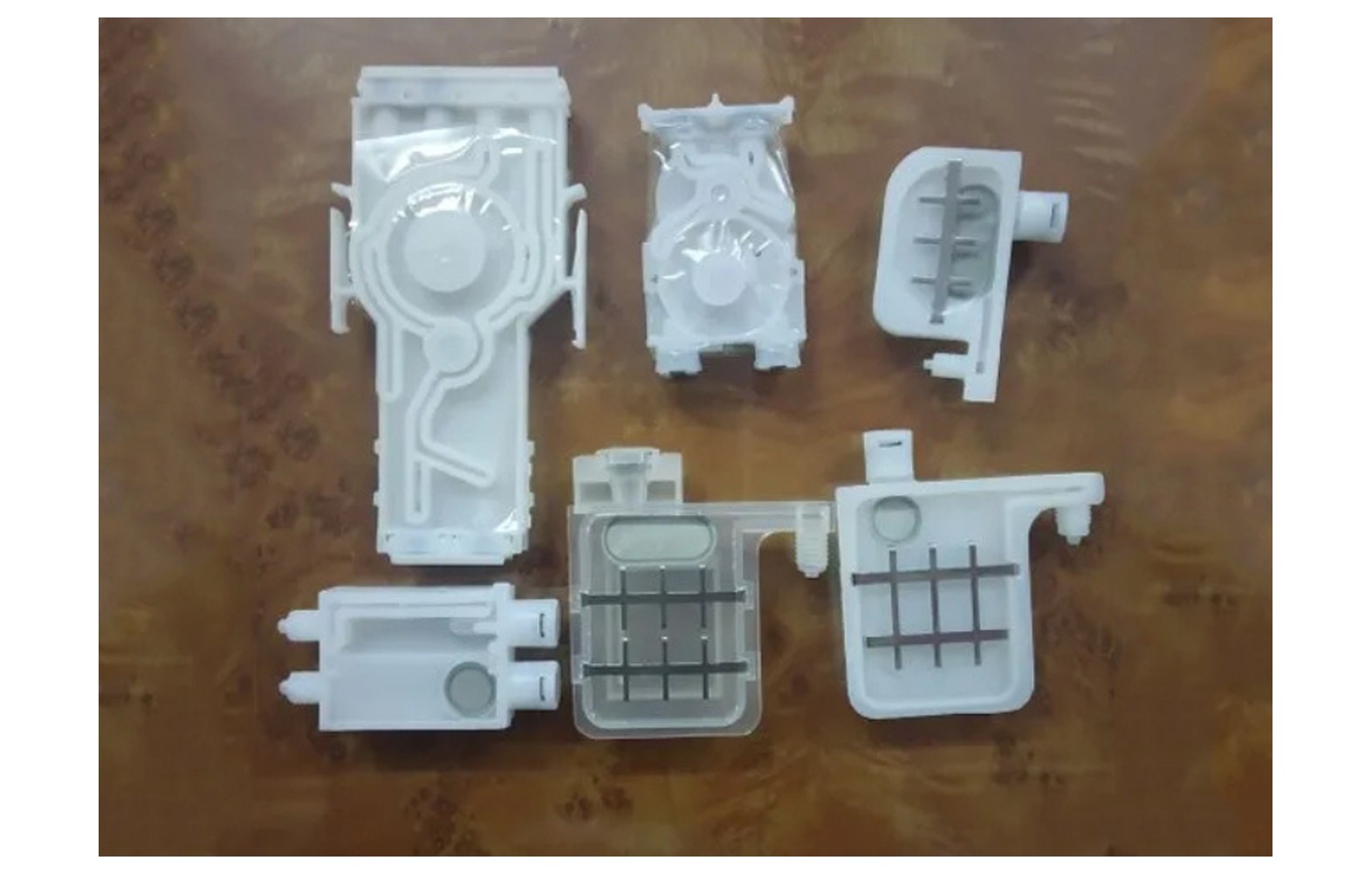
Direct answer: A damper may help manage ink delivery in an eco-solvent printer, but its design and function depend on the exact machine. Confirm the printer, head, approved ink and manufacturer part number before buying. Weak colour or nozzle dropout does not by itself prove a damper has failed; use model-specific diagnostics and authorised service.
Start with the installed ink system
An eco-solvent printer can use reservoirs, lines, filters, pumps, valves, dampers and a maintenance station in a model-specific arrangement. Not every printer uses identical components or a universal ink path. Obtain the manufacturer’s diagram and service documentation for the actual machine.
Record model, serial, revision, head variant, approved ink, control system and any conversion or modification. The installed configuration may differ from an original catalogue. Ask the manufacturer or authorised technician to identify the damper and its role before ordering a spare.
This guide helps owners plan and ask questions; it does not provide a universal ink-line, flushing or replacement procedure. Work outside operator authority belongs to trained and authorised personnel following the exact manual and site controls.
What a damper may do
Depending on the printer design, a damper can help manage aspects of ink delivery to the printhead. Its construction and exact function vary, and it may interact with other components. The manufacturer’s description for the specified part is the appropriate reference.
A damper is not a standalone cure for every output defect. The ink path, maintenance station, head, media feed, artwork and settings can all influence printing. A technician should assess the complete system rather than replacing a part based on one symptom.
Do not infer that two devices are interchangeable from their name, colour or appearance. Ask for the full part number and the exact supported printer, head, ink and related fittings.
Ink compatibility
Eco-solvent formulations are not automatically interchangeable. Materials in a damper, seal, tube or connector must be compatible with the approved ink and maintenance fluids for the machine. A supplier’s broad solvent-resistant claim does not establish suitability for every product.
Ask the printer manufacturer for its approved component and ink list. If a compatible part is offered, request written specifications and check the manufacturer’s support and warranty position. Do not mix inks or use an unapproved conversion procedure.
Obtain safety data sheets for the actual ink and cleaning products. Qualified site professionals should assess ventilation, fire precautions, storage, personal protection, spills and waste handling under local requirements. The word eco does not eliminate the need for safety controls.
Identify the correct spare
Confirm the printer serial and revision, installed head variant, ink, damper function and manufacturer part number. Ask whether a listed replacement is an approved supersession for that exact configuration. A catalogue that names only a head family may not cover machine-specific differences.
Ask whether seals, connectors or related components are included, and whether the quotation covers authorised installation and testing. A similar fitting or external size does not establish the correct internal construction or operating characteristics.
Do not remove guards or disconnect an ink line merely to photograph a part. The manufacturer may identify it from the machine record. If physical inspection is needed, an authorised technician should use the model-specific safety procedure.
Symptoms are not proof of failure
Weak colour, intermittent output, banding, missing lines or a change after idle time can have several causes. Artwork, profile, media, ink, maintenance station, head and other delivery components should be considered under the manufacturer’s diagnostic process.
Record the job, settings, ink, material, affected colour, timing and last accepted output. Retain a marked physical sample and any displayed message. A nozzle check can be useful evidence at that moment, but does not alone prove the damper has failed.
If there is a leak, unusual smell, damaged cable or unsafe movement, stop using the site procedure and notify the responsible supervisor. Do not continue a hazardous run or open an ink line to meet a deadline.
Diagnose before replacement
Provide the authorised technician with the machine configuration, service history, current ink, approved maintenance products and before samples. Ask which tests distinguish a fluid-path issue from artwork, profile, head or media causes. The correct sequence is model-specific.
Request a written diagnosis, proposed part number, service scope and any remaining uncertainty. If the fault is intermittent, agree a safe representative test that reflects the operating stage where it occurred. Do not replace several parts at random and assume which one solved the issue.
Use a pre-qualified backup printer or subcontractor for urgent work if needed. Confirm colour, media and delivery requirements before relying on the alternative. A deadline does not justify an unverified part or unsafe service.
Genuine, compatible and used offers
A genuine component should still be checked against the exact machine, revision, head and ink. Ask how identity and source are verified and what the warranty covers. A genuine part for another configuration may be unsuitable.
For a compatible damper, request its specific materials, approved inks, machine applications and written warranty. Ask the printer manufacturer or authorised service provider whether use affects support. A similar shape or lower price does not establish performance.
A used or refurbished ink component may have uncertain history or prior fluid exposure. Ask what was tested, how it was stored and who accepts the risk. The manufacturer and qualified technician should determine whether reuse is supported.
Safe service responsibilities
Only personnel trained and authorised for the exact printer should isolate and service its ink path. Follow the manufacturer’s instructions for handling, installation, restart and disposal. Do not improvise a universal pressure, priming or flushing sequence.
Site procedures must address the actual chemicals, protective equipment, fire precautions, spills and waste. Obtain guidance from qualified professionals and the safety data sheets. Do not bypass guards or manipulate moving equipment during service.
Agree who supplies the parts and related fittings, who performs the work and how the result will be verified. If the technician discovers another fault, require a revised scope and approval before additional work.
Acceptance after authorised replacement
- Record the baseline: symptom, printer configuration, ink, settings and reference output.
- Verify the part: exact number, condition, approved ink and related components.
- Perform authorised service: use the manufacturer’s isolation and installation process.
- Restore safety: confirm guards and protective systems under the service procedure.
- Run approved checks: follow the exact machine’s test instructions.
- Print representative work: use the intended media, ink and quality mode.
- Document release: retain the service report, sample and remaining limitation.
A successful short print provides evidence under those conditions; it does not guarantee a component lifetime or rule out every other fault. Ask the technician how to monitor an intermittent issue safely.
Supplier and cost checks
Ask for the exact part number, machine revision, head and approved ink, part condition, related fittings, installation, freight, tax, warranty and return terms. Compare like-for-like scopes rather than a component-only price against a complete service visit.
For a hypothetical example, a component costs Rs 1,000, freight Rs 200 and authorised labour Rs 800. The illustrative subtotal is Rs 2,000 before taxes and other expenses. These invented figures are not market prices. Use current written quotations and record uncertainty in the diagnosis.
Review whether to stock a verified spare based on lead time, storage and machine history. Protect it from contamination and label the approved machine and part number. Reassess inventory after an authorised ink or head conversion.
Common mistakes
Ordering by head family name: verify the exact printer, head variant, ink and part number.
Assuming weak colour proves damper failure: diagnose the complete system.
Mixing unapproved ink or fluids: follow the machine manufacturer and safety data sheets.
Performing untrained ink-line work: use authorised service and the model-specific procedure.
Skipping acceptance: compare representative output and retain the report.
Questions to ask
- What is the exact damper number and role in this printer?
- Which inks and related components are approved?
- What evidence supports replacing it?
- Who installs it and how is the system checked?
- What warranty, storage and return conditions apply?
For broader engineering read printer ink delivery systems. For purchasing see the eco-solvent spares buyer guide.
Conclusion
Identify an eco-solvent damper by the exact printer, head, ink and part number, then use qualified diagnosis and authorised service. A familiar appearance or single print defect does not establish a correct replacement.
Why vinyl and sticker work needs a representative test
Eco-solvent shops often produce close-viewed decals, stickers, labels or vehicle graphics. These applications can reveal fine colour or registration defects that are less obvious on a distant banner. The correct test should therefore use an approved file and material representative of the work actually sold, not only a small generic demonstration.
Ask the customer which colours and details are critical, and retain the accepted proof. Use the intended profile, ink and quality mode. Inspect relevant colours and gradients at the agreed viewing distance. A test that uses a different media coating or quality mode may not answer the customer’s question.
If the original defect appears only after a longer run, document the length and conditions and ask the technician to design an appropriate safe test. A short acceptable sample is useful evidence but does not prove that the intermittent issue has disappeared.
Damper, filter and pump: avoid a naming mix-up
Owners and sellers may use the words damper, filter and pump loosely. The manufacturer’s diagram should identify the actual assembly and its role. Ask which component is being quoted and where it belongs in the installed configuration before comparing prices.
A damper may include an internal element, but it should not be assumed to replace every filter or perform every pump function. The system design determines the relationship. Request the approved service scope and related part numbers rather than choosing components from a generic list.
If a technician recommends more than one replacement, ask which evidence supports each item and how the work will be verified. Some assemblies may require related components under the manual, but the reason should be documented for the actual machine.
Handling a printer with uncertain history
A used or previously modified eco-solvent printer may have incomplete records. Ask for the original model and serial, invoices, service reports, ink history and evidence of authorised conversions. Missing records increase uncertainty but do not by themselves prove that a component is defective.
Have the manufacturer or authorised service provider assess the installed configuration before ordering. Do not open the ink path or remove guards simply to match a photograph. A technician can document the actual assembly under the safe procedure and request the correct part number.
If the printer uses an ink not documented as approved, ask the manufacturer for a complete assessment. Changing one damper without resolving system compatibility may not restore reliable production. The safety and warranty implications should be reviewed before any conversion.
Compare supplier evidence
Ask each supplier to state the exact printer revision, head variant, ink and manufacturer number in the quote. Clarify whether the item is genuine, compatible, refurbished or used, and what related seals or fittings are included. Similar names do not establish identical chemical or mechanical properties.
Compare the total scope: diagnosis, part, freight, tax, authorised labour, approved consumables, testing and warranty. Mark any missing term as unknown rather than zero. Ask who decides the next step if the replacement does not resolve the original symptom.
Check return and storage conditions before opening the package. If the part number conflicts with the approved record or the packaging appears damaged, hold it and contact the supplier. Do not force a connection or alter the part to make it fit.
Traceability and stock control
Record supplier, receipt date, part number, condition, approved machine and any shelf-life instruction. Protect the component from contamination according to the supplier. Keep similar parts for different printers or ink systems separate.
Issue a spare only after the authorised service provider confirms the application and diagnosis. Stocking a component does not authorise an operator to open an ink line. Record the technician, installation and test results so a later incident can be compared with the baseline.
Review the inventory after an approved ink, head or machine modification. A spare for the previous configuration may not remain suitable. Obtain written confirmation and separate uncertain stock until the manufacturer or authorised technician resolves its status.
After-service comparison
Agree the acceptance file, ink, media and quality mode before work begins. Ask the technician to document the part and related work, then compare the original symptom with representative output. Confirm guards and safety systems are restored under the service procedure.
If a colour or nozzle issue returns, preserve the new sample and consult the service provider. Do not repeatedly clean or replace dampers without an updated diagnosis. An intermittent symptom can have more than one cause.
Customer acceptance is separate from technical service. Compare any reprinted sticker or graphic with the approved proof for colour, dimensions and finishing. Record a revised delivery date or accepted variation with the customer.
Plan for a repeated colour defect
At shift handover, report the file, affected colour, media, ink and operating stage rather than describing the machine simply as clogged. Keep the manufacturer-approved nozzle pattern and any customer-quality sample with the job. Record only checks that operators are authorised to perform.
If the defect appears again after service, provide the technician with the original report and new sample. Do not conclude that the replacement damper has failed without a fresh system assessment. A similar symptom can arise from a different cause or from an unresolved issue elsewhere in the ink path.
Ask the service provider to state the next approved diagnostic step and any additional cost before work. If safety is in doubt, stop and follow the site procedure. Use pre-qualified alternate production for an urgent order rather than opening the ink system without authorisation.
After resolution, review whether the machine record, approved consumables and supplier contacts were sufficient. Update training and spare identification as needed without inventing a universal replacement interval.
Keep the approved sample and service contact available to each shift for the next production run.
Retain approved records.
Frequently Asked Questions
What does an eco-solvent printer damper do?
In some designs it helps manage aspects of ink delivery. Its exact function and construction depend on the printer.
Does weak colour always mean a damper failed?
No. Ink delivery, head, maintenance, media, artwork and settings can all contribute. Obtain a model-specific diagnosis.
Are all eco-solvent dampers interchangeable?
No. Confirm the exact printer, head variant, approved ink and manufacturer part number.
Can any eco-solvent ink be used with a damper?
No. Verify the approved formulation and component materials with the machine and part suppliers.
Can an operator replace a damper without training?
Ink-system service requires personnel authorised for the exact machine using its procedure and site safety controls.
How often should dampers be replaced?
There is no universal interval. Follow model-specific service guidance and a qualified condition assessment.
How is replacement checked?
Run approved system checks and representative output, then retain the technician’s report and any limitations.
