

Direct answer: In the i3200 vs i1600 comparison, both are Epson PrecisionCore MicroTFP printheads with the same housing, the same 33.8 mm print width, the same 600 npi resolution over two rows and the same droplet sizes. The difference is nozzle count. The i3200 has 3,200 nozzles in eight rows, while the i1600 has 1,600 nozzles in four rows. In practice the i3200 delivers roughly twice the ink output per pass and is the choice for production machines, while the i1600 costs much less and suits compact DTF, sublimation and UV printers where speed matters less than purchase and replacement cost. Both come in versions for water-based, eco-solvent and UV inks, so the version must still match your ink.
If you are choosing between a cheaper i1600 machine and a faster i3200 machine, or deciding which head to replace, this guide explains what you gain and what you give up.
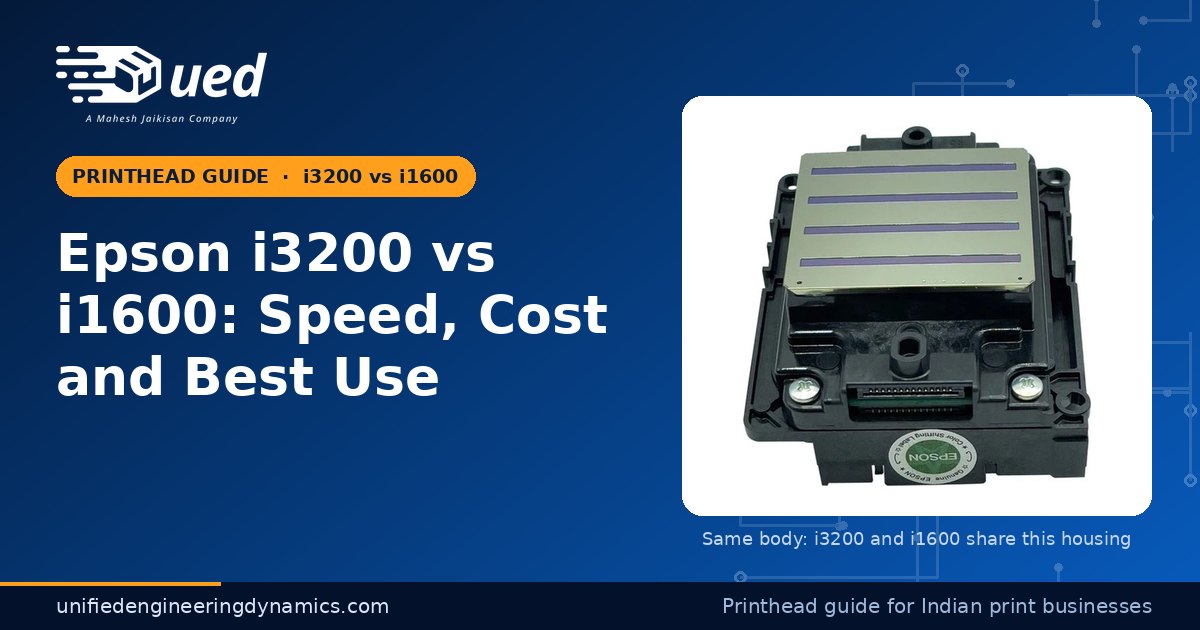
Table of Contents
Two Heads, One Platform
Epson builds the i1600 on the same platform as the i3200. Size, mounting points, nozzle spacing, droplet technology and print width are shared, so the two heads look almost identical on the bench. Epson effectively halved the nozzle rows to create a lower-cost head for smaller machines and entry-level production.
| Specification | Epson i3200 | Epson i1600 |
|---|---|---|
| Technology | PrecisionCore MicroTFP | PrecisionCore MicroTFP |
| Nozzles | 3,200 | 1,600 |
| Nozzle rows | 8 rows of 400 | 4 rows of 400 |
| Resolution | 300 npi per row, 600 npi over 2 rows | 300 npi per row, 600 npi over 2 rows |
| Print width | 33.8 mm (1.33 inches) | 33.8 mm (1.33 inches) |
| Maximum colours | 4 per head | 4 per head |
| Binary droplet | 5–6 pl at 43.2 kHz (by version) | 5–6 pl at 43.2 kHz (by version) |
| Size | About 69.1 x 59.4 x 35.6 mm | About 69.1 x 59.4 x 35.6 mm |
| Weight | About 82 g | About 80 g |
Because the bodies match, the visual difference is small. Always confirm the model on the head label rather than judging by appearance.
i3200 vs i1600: What the Nozzle Count Means
With four colours on one head, the i3200 gives each colour two rows of 400 nozzles, or 800 nozzles per colour. The i1600 with four colours gives each colour one row, or 400 nozzles per colour. With two colours, the i1600 gives each colour two rows, which keeps full 600 npi resolution per colour.
| Configuration | i3200 nozzles per colour | i1600 nozzles per colour |
|---|---|---|
| 4 colours per head (CMYK) | 800 (2 rows, 600 npi) | 400 (1 row, 300 npi) |
| 2 colours per head (for example white + varnish) | 1,600 (4 rows) | 800 (2 rows, 600 npi) |
| 1 colour per head | 3,200 | 1,600 |
This explains why many i1600 DTF printers use two heads: one for CMYK and one for white. It also explains why an i3200 machine can print the same quality in fewer passes.
Speed and Productivity
More nozzles mean more ink laid down per pass. At the same resolution and pass count, an i3200 can cover an area roughly twice as fast as an i1600 with the same number of heads. Real throughput depends on carriage speed, pass mode, media, curing or drying capacity and RIP settings, so treat manufacturer speed claims as best-case figures.
- i3200 machines suit shops running long daily shifts, large orders and wide-format production.
- i1600 machines suit smaller daily volumes, sampling, short runs and new businesses that want lower entry cost.
- Multi-head i1600 machines can close some of the gap, but cost and complexity rise with each head.
Print Quality
Droplet sizes and grayscale modes are the same, so image quality per pass is comparable. Quality differences come from how many passes each machine needs to fill the image and from configuration. An i1600 printing four colours on one head uses one row per colour, so it may need more passes to match the smoothness of an i3200. In two-colour configurations, quality per colour is equal to the i3200.
For most DTF transfers, sublimation prints and UV gift items, a well-tuned i1600 machine delivers excellent results. The trade-off is time, not detail.
Ink Versions: A1, E1 and U1
Like the i3200, the i1600 is offered in versions matched to ink chemistry. The rule is the same: water-based ink needs an A1 head, eco-solvent ink needs an E1 head and UV ink needs a U1 head. Using the wrong version leads to clogging, colour shift and permanent damage. Our guide to the Epson i3200 A1 vs U1 vs E1 printheads explains these differences in detail, and the same logic applies to the i1600.
| Version | Ink | Typical i1600 machines |
|---|---|---|
| i1600-A1 | Water-based (DTF, sublimation, pigment) | 30 cm, 40 cm and 60 cm DTF printers, compact sublimation printers |
| i1600-E1 | Eco-solvent | Entry-level signage and photo printers |
| i1600-U1 | UV-curable | A3 and A4 UV flatbeds, compact UV DTF printers |
Price and Running Cost
The i1600 is the cheaper head to buy and replace. On our store the Epson i1600 printhead is listed well below the i3200 versions, which are listed at ₹92,000 each for the i3200-A1, i3200-E1 and i3200-U1. Market prices move with supply, so confirm current prices before ordering.
Purchase price is only part of the cost. Consider:
- Cost per print: a faster i3200 machine spreads labour, rent and power over more output.
- Replacement risk: a failed i1600 is a smaller loss, which matters for new operators still learning maintenance.
- Machine price: i1600 printers are usually cheaper because the heads and boards cost less.
- Downtime: spare heads are cheaper to keep in stock for i1600 machines.
Our article on printhead running cost and lifespan in India explains how to compare heads on cost per square metre rather than purchase price alone.
Head Life and Durability
Both heads use the same PrecisionCore construction and are designed for industrial duty. Head life depends far more on ink quality, maintenance, voltage settings, power stability and operator care than on the model. A well-maintained i1600 can outlast a neglected i3200. Use the correct ink version, keep capping stations clean, avoid long idle periods and set voltage correctly. Our guide to head voltage settings and head life explains why the electrical side matters so much.
Boards and Compatibility
The two heads share a mechanical footprint, but they are not plug-and-play substitutes. The controller system must support the specific head, its channel count and its waveform. Before swapping or upgrading, check:
- Whether your main board and head board support the target head.
- Whether firmware or software updates are required.
- How colour channels will be mapped across the reduced or increased number of rows.
- Whether the carriage, cables and dampers suit the new configuration.
- Whether the RIP profiles need to be rebuilt.
Converting an i1600 machine to i3200 heads is usually a board-level upgrade, similar to the XP600 to i3200 board kit conversion. Get a full parts list and quotation from your machine supplier first.
Which Machines Use Each Head
| Machine type | Common head choice | Why |
|---|---|---|
| 30 cm desktop DTF | i1600-A1 (1–2 heads) | Lower cost, adequate speed for small volumes |
| 60 cm production DTF | i3200-A1 (2–4 heads) | Higher output for bulk orders |
| A3 UV flatbed | i1600-U1 or i3200-U1 | i1600 for budget, i3200 for speed and white density |
| UV roll-to-roll | i3200-U1 | Wide formats need throughput |
| Eco-solvent vinyl printer | i3200-E1 | Production signage volumes |
| Sublimation paper printer | i3200-A1 or i1600-A1 | Depends on daily volume |
For DTF buyers comparing heads, our guide to the best printhead for DTF and T-shirt printing also covers the XP600.
i3200 vs i1600: How to Decide
Start with your expected daily output and budget, then weigh the trade-offs.
| Your situation | Better choice |
|---|---|
| New business, small daily volume, tight budget | i1600 |
| Established shop with steady bulk orders | i3200 |
| Need fast delivery during festival and wedding peaks | i3200 |
| Operators still learning head maintenance | i1600 (lower replacement risk) |
| Heavy white ink usage in UV or DTF | i3200 (more nozzles for white) |
| Sampling, proofing or personalised one-offs | i1600 |
A useful rule: if your machine will run most of the working day, the extra cost of i3200 usually pays back through higher output. If it runs a few hours a day, the i1600 is often the smarter purchase.
Common Mistakes When Choosing
- Comparing heads only on price and ignoring output per hour.
- Assuming an i1600 is a lower-quality head; it is the same technology with fewer nozzles.
- Buying the wrong ink version because the head body looks the same.
- Expecting to swap heads without checking board and software support.
- Believing machine speed claims without seeing a demo at the resolution you will actually use.
Questions to Ask Your Machine Supplier
- Which head and version does the machine use, and how many heads?
- What real speed does it achieve at the resolution and pass mode I need?
- What is the current replacement price of the head?
- Are heads and spare boards stocked locally?
- Can the machine be upgraded to more heads or a different head later?
- What warranty applies to heads, and what conditions void it?
Ask for a demonstration with your own files and media. A sample printed on your actual jobs is the most reliable way to compare an i1600 machine with an i3200 machine.
i3200 vs i1600 Real-World Output
Speed figures on brochures are measured in ideal conditions, usually at low pass counts and draft resolution. In daily production, operators choose higher pass modes for quality, slow down for difficult media and pause for maintenance. A fair comparison uses the same pass mode, resolution and media on both machines. In most shops, an i3200 machine finishes a day’s queue noticeably faster, while an i1600 machine needs either more hours or more heads to keep up with the same orders.
| Factor | Effect on real output |
|---|---|
| Pass mode | Higher passes improve quality but reduce speed on both heads |
| Number of heads | Two i1600 heads can approach one i3200 in some layouts |
| White ink layers | Heavy white printing favours more nozzles per channel |
| Drying or curing capacity | Can limit speed regardless of the head |
| Maintenance time | Similar for both; poor maintenance slows any machine |
Upgrading Later: Planning Ahead
Many businesses start with an i1600 machine and later want more speed. Before buying, ask whether the machine can be upgraded to additional heads or to i3200 heads, and what that would cost. Some manufacturers offer upgrade paths with new boards and carriages; others do not. If an upgrade is impractical, plan to sell the smaller machine and buy a production model when volumes grow. Keeping service records and running the machine carefully protects its resale value.
- Ask about upgrade kits and their cost at the time of purchase.
- Check whether the carriage has space for extra heads.
- Confirm that the board supports more channels.
- Keep invoices and maintenance logs for resale.
i3200 vs i1600 Maintenance Differences
Daily care is almost identical for both heads: nozzle checks, clean caps and wipers, matched cleaning fluid and stable room conditions. The main difference is the number of channels to monitor. An i3200 printing four colours has two rows per colour, so a few missing nozzles in one row may be partly hidden by the second row during multi-pass printing. An i1600 printing four colours has one row per colour, so missing nozzles show more quickly. Regular nozzle checks matter on both, but they are especially important on four-colour i1600 layouts.
Spare Parts and Service Availability
The i3200 has been in the market longer and is fitted to more production machines, so technicians, boards, dampers and capping parts are widely available. The i1600 shares many parts, including the body footprint, but confirm that your supplier stocks the exact head, caps and dampers for your machine. Ask local technicians about their experience with your machine model before buying, because quick service often matters more than small differences in head price.
Example: Choosing for a DTF Startup
Consider a new DTF business expecting a modest number of T-shirt transfers each day, mainly small orders, with occasional bulk jobs during festivals. A compact machine with two i1600-A1 heads keeps the initial investment and replacement risk low, and the owner can outsource or run extra hours during peaks. If the same business already has steady bulk orders from schools, companies or event organisers, a 60 cm machine with i3200-A1 heads would deliver the output needed without long shifts. The right choice depends on demand, not on the head alone.
Whichever head you choose, insist on a demonstration using your own artwork before you buy.
Resale Value
Machines with popular, well-supported heads hold their value better. i3200 production printers are widely known in the second-hand market, while compact i1600 machines appeal to new businesses looking for low-cost entry. Keep service records, nozzle check logs and invoices to support a good resale price whichever head you choose.
Further reading: both heads fire drops using piezoelectric elements; see Wikipedia’s overview of piezoelectricity for the underlying principle.
Key Takeaways
- The i3200 and i1600 share the same body, print width, resolution and droplet sizes.
- The i3200 has 3,200 nozzles in eight rows; the i1600 has 1,600 nozzles in four rows.
- The i3200 delivers roughly twice the output per pass; the i1600 costs much less.
- Both come in A1, E1 and U1 versions, which must match the ink.
- Swapping between them requires board and software support, not just a new head.
Our Verdict
The i3200 vs i1600 decision comes down to volume. Choose the i3200 for production machines that run long hours, handle bulk orders or use heavy white ink. Choose the i1600 for compact DTF, sublimation and UV printers where lower purchase and replacement cost matter more than maximum speed. In both cases, match the version to your ink, set the board correctly and maintain the head well, and either head will deliver professional quality.
Frequently Asked Questions
Is the i1600 lower quality than the i3200?
No. Both use the same PrecisionCore technology, resolution and droplet sizes. The i1600 has half the nozzles, so it is slower, but print quality per pass is comparable when configured correctly.
Can I replace an i1600 head with an i3200 in my printer?
Not directly. The bodies match, but the board, firmware and software must support the i3200 and its extra channels. Treat it as an upgrade project and check with your machine supplier first.
Why do many DTF printers use two i1600 heads?
With two heads, one can print CMYK and the other white. This gives more nozzles to each channel than a single head, improving speed and white density at a lower cost than i3200 heads.
Which head is better for a new DTF business?
For small daily volumes and a limited budget, an i1600 machine is usually the sensible start. If you expect bulk orders from the beginning, an i3200 machine will deliver better output per hour.
Do i1600 heads come in UV and eco-solvent versions?
Yes. The i1600 is offered in versions for water-based, eco-solvent and UV inks. Always match the version to the ink your machine uses.
Does the i1600 last as long as the i3200?
Both are designed for industrial duty. Real head life depends mainly on ink quality, maintenance, voltage settings and power stability rather than on the model.
Is the i3200 worth the higher price?
It is worth it if your machine runs for long hours or you need fast delivery on large orders. For light daily use, the extra speed may not justify the extra cost.
