



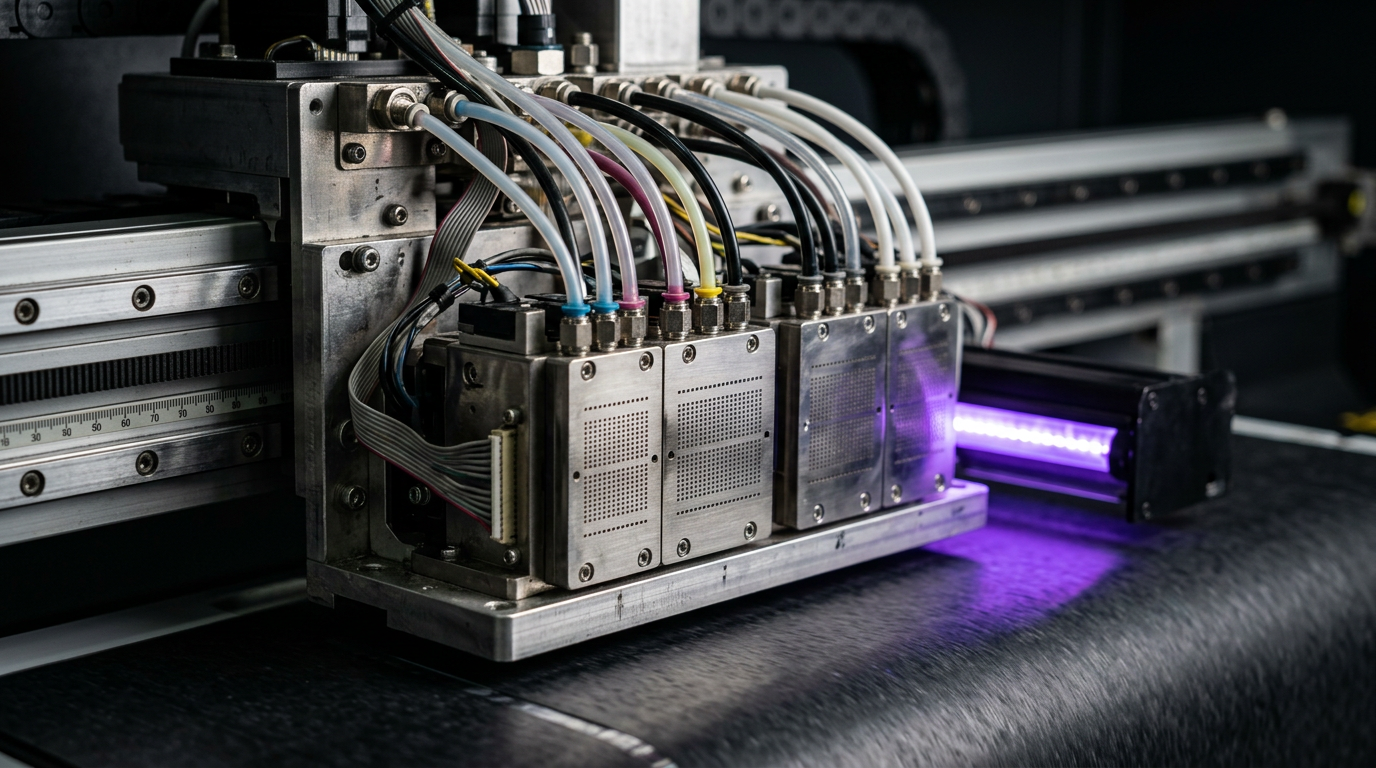
Direct answer: An ink delivery system moves compatible ink from a reservoir to the printhead under the conditions the machine requires. Different machines use different combinations of pumps, dampers, filters, valves and recirculation; do not assume every printer has the same layout.
Engineering Principles and Components
| Topic | Function | Practical check |
|---|---|---|
| Reservoir and tubing | Store and route compatible ink. | Follow storage and replacement guidance; inspect for approved signs of leaks. |
| Pump | Moves ink or supports maintenance in systems designed to use it. | Pump function and service sequence vary by machine. |
| Filter | Helps control specified contamination in the ink path. | Filter ratings and replacement intervals are manufacturer-specific. |
| Damper | A supply component used in some printers to manage ink delivery. | Do not assume the same design or function on every model. |
| Circulation | Some systems move ink through a defined path. | Whether and how circulation is used depends on the ink and head system. |
Practical Shop Checklist
- Consult the machine ink-flow diagram and the exact head requirements.
- Use only compatible ink, filters, dampers and cleaning fluids.
- Record symptoms and nozzle checks before replacing components.
- Use a qualified engineer for leaks, electrical work or opening the ink path.
Why Ink Delivery Matters
An inkjet printer needs more than a functioning printhead. It also needs a reliable way to store, condition and deliver compatible ink to that head. If the supply is interrupted or unstable, the visible symptom can be a missing nozzle, uneven colour, banding or a machine warning. Those symptoms do not prove that any particular pump, filter or damper is defective.
The ink system is designed around the specific head, ink chemistry and printer architecture. A small cartridge printer, a roll-to-roll machine and a UV flatbed may have very different plumbing. Some use gravity, some pumps, and some a combination of mechanisms. Some circulate selected inks while others do not. Use this guide to understand the functions and questions involved, not as a plumbing diagram for your machine.
Opening an ink circuit can introduce air, cause leaks or expose operators to chemicals. Do not disconnect a line, apply pressure or replace an internal component unless the manufacturer authorises the procedure and the person performing it is trained. Observe guards, electrical safety requirements and the applicable ink safety data sheet.
A Typical Ink Path: From Container to Printhead
In a simplified example, ink starts in a cartridge or reservoir. It travels through a machine-specific path to the printhead, where controlled firing ejects droplets onto the substrate. Along the way, the system may use a filter to manage specified contaminants, a damper to support the intended supply behaviour, and pumps or valves to move or control ink. Maintenance components can also draw or collect ink during approved cleaning operations.
That description is intentionally generic. The number and position of components, the direction of flow and the means of maintaining pressure differ. A pump used for cleaning is not automatically the pump responsible for production ink delivery. A white-ink circulation circuit may have a different route from a colour channel. Obtain the correct manufacturer’s diagram or service documentation rather than assuming the arrangement.
Ink leaving the nozzle is influenced by conditions upstream. Incompatible chemistry, contamination, air, incorrect service work or a fault in a component can affect the overall system. At the same time, a poor print can result from feed, alignment, media or RIP settings. Diagnosing a delivery problem therefore starts with the approved nozzle test and a documented history, not with replacing parts at random.
Reservoirs, Cartridges and Containers
The reservoir holds ink until the printer requires it. Depending on the equipment, it may be a replaceable cartridge, a bulk tank or another manufacturer-designed container. The machine may have sensors or software that report ink level and supply status. Follow its instructions for checking and replacing supplies; not every indicator measures the same condition.
Use the approved ink product and observe the supplier’s storage and handling requirements. Keep product identification and batch details available for troubleshooting. Protect the ink from contamination and do not top up with an unknown formulation. If a change of ink product is being considered, ask the printer and ink suppliers about compatibility and the authorised conversion procedure before introducing it.
Some inks need specified preparation or agitation. Others have different handling rules. Do not assume that every container should be shaken or that a settled-looking ink is safe to use after an improvised treatment. Refer to the label, technical information and safety data sheet for the actual product.
Ink Tubing, Fittings and Seals
Tubing connects components in the supply path. Its material, dimensions, routing and fittings are selected for the printer and ink. The system must contain the fluid and operate under the conditions expected by the head and pumps. A damaged line or fitting may cause a leak or allow the system to behave incorrectly, but the symptom and remedy depend on the design.
Operators may be able to observe external leakage in areas the manual permits them to inspect. Do not squeeze tubing, pull fittings, change the routing or attempt to seal a leak while the machine is operating. Stop safely and follow the documented response. Use the correct personal protective equipment and spill procedure specified in the safety data sheet and site instructions.
Replacement parts are not interchangeable merely because they fit physically. Material compatibility, connection type and manufacturer approval matter. A service engineer can check the correct part and perform any required priming or testing. Record the repair and retain the relevant service report.
What Does an Ink Damper Do?
A damper is a component used in some inkjet supply systems to support stable ink delivery. The internal design and exact role vary. A damper may incorporate features intended to moderate pressure changes, hold a small supply volume or filter ink, depending on the product. Do not assume that every damper includes every function, or that every printer has a damper.
Online advice sometimes treats a damper as the automatic cause of missing nozzles. That shortcut is unreliable. Similar symptoms can arise from several parts of the system or from unrelated print-quality factors. A qualified technician should evaluate the model-specific layout and symptoms before recommending replacement.
If a damper is scheduled for service, use a manufacturer-approved part and procedure. Opening the ink path can introduce air or lead to leakage, and the correct restart process depends on the printer. An operator who is not trained for that work should not remove or refill a damper as an experiment.
Filters and Ink Cleanliness
A filter helps control certain contaminants in the fluid path. Filters differ in construction, placement, material and rating. A filter that is appropriate for one ink or head is not necessarily appropriate for another. A restriction can also affect flow, so correct selection and replacement are engineering decisions guided by the equipment manufacturer.
Some components marketed as dampers include filtering features, while other systems use separate filters. Ask the service provider what is installed and which maintenance interval applies. Do not infer the correct rating or replacement schedule from a generic online listing. Installing an unapproved part can create compatibility or flow problems.
Filter condition is only one possible factor when ink delivery seems poor. The supply, pumps, fittings, head and controls may also require assessment. Avoid bypassing a filter to see whether a printer starts working. That experiment can expose downstream components to contamination and may make the problem worse.
Pumps: Different Jobs in Different Printers
A pump moves fluid by a design-specific mechanism. In an inkjet printer, a pump may support supply, circulation, cleaning or waste handling, depending on the machine. The fact that you can hear a motor or pump does not prove that the correct ink flow is reaching the head. Conversely, not every printer uses a continuously running supply pump.
A maintenance pump may work with the cap or cleaning station during an approved cleaning cycle. A circulation pump may move ink through a defined circuit. These functions can be separate. Ask the supplier to identify the relevant component and how it is tested for your model rather than substituting a part based only on the word pump.
Electrical testing, pump replacement and opening the circuit should be performed under the manufacturer’s service procedure by appropriately qualified personnel. Operators can help by recording error messages, unusual sounds and when they occur. If there is an electrical warning, leakage or another safety concern, stop safely and request service.
Pressure and Head Supply: Why Settings Are Not Universal
A printhead requires an ink supply within the conditions intended by its design. Pressure at the head, ink properties and the arrangement of the fluid system all influence jetting. Different printers achieve the required condition in different ways, and some use controlled negative pressure or other manufacturer-specific arrangements.
There is no safe universal pressure setting for all heads. A number copied from another model can be inappropriate or damaging. Do not adjust regulators, head parameters or service settings without the manufacturer’s authorised procedure. If a pressure-related warning appears, record the message and contact service rather than trying random values.
Environmental conditions can also interact with ink behaviour and the machine. Follow the printer and ink specifications for operating conditions. If the printer has recently moved, been serviced or experienced an unusual event, include that information in the service record. The relevant response is model specific.
White Ink, Agitation and Recirculation
Many white inks contain pigment that can settle during storage or inactivity. Some printers use agitation or recirculation to help manage the ink condition. The specific circuit matters: ink may circulate through a reservoir, a portion of the supply path or a head designed for circulation. Do not assume all systems circulate through the same components or have the same maintenance needs.
Follow both the ink and printer suppliers’ instructions for storage, preparation and operation. If the instructions differ or are unclear, ask the suppliers to resolve the conflict for the installed configuration. Do not add an aftermarket pump or modify the return path to imitate another machine.
If white coverage becomes inconsistent, preserve a nozzle test, record the job and check the machine’s normal indicators. Agitation, jetting, substrate, white-layer settings and other factors can all be relevant. The symptom alone does not prove a circulation pump has failed.
How Ink Delivery Faults Can Appear
| Observation | Possible areas to investigate | Safe first response |
|---|---|---|
| Missing nozzle marks | Head condition, supply, maintenance station or electrical system | Save the approved nozzle test and follow the documented recovery sequence. |
| Dropout returns after cleaning | Recurring supply or maintenance condition among other possibilities | Record timing and cleaning results; consult the authorised technician. |
| Colour changes during a job | Jetting, ink supply, profile, substrate and other variables | Stop affected output and compare a test and approved proof. |
| Visible ink leak | Container, line, fitting or another component | Stop safely and follow the spill and service procedure. |
| Low-ink or pressure warning | Supply, sensor or control condition specific to the model | Record the exact warning and follow the manual. |
| White coverage is inconsistent | White-channel jetting, ink handling, settings or substrate | Check the approved test and relevant operating indicators. |
None of these observations identifies a component by itself. A technician may need the printer’s diagnostic tools, service history and safe access procedures to establish the cause. Do not bypass safeguards or introduce a different ink in order to test a theory.
A Safe Troubleshooting Sequence for Operators
- Describe the symptom. Record the affected colours, the print mode, when the defect appeared and whether the machine displayed an error. Stop immediately if there is a safety concern.
- Preserve the baseline. When safe and allowed by the manual, print a nozzle check and label it with the date, machine and current configuration. Keep the sample.
- Review recent changes. Note ink or material changes, long idle periods, maintenance, relocation and any recent head strike. A change can be relevant without being proof of causation.
- Check normal indicators. Use the operator controls and visible checks described by the manufacturer. Confirm that approved ink is installed and note warnings accurately.
- Follow authorised recovery. Perform only the cleaning or user maintenance sequence prescribed by the manual. Record each action and observe any specified limits.
- Re-test. Save a second nozzle pattern and compare it with the first. Describe the result objectively rather than declaring a part faulty.
- Escalate. If the issue continues or requires opening the ink path, contact an authorised service provider. Provide the tests, error messages, ink details and actions already taken.
This process helps avoid replacing parts based on guesswork. It also creates a useful history if a fault returns. The manufacturer may prescribe a different sequence for a particular model, and that procedure takes priority over a general guide.
Example: A Colour Channel Drops Out After an Ink Change
Imagine that a shop replaces an approved ink container and later sees missing marks in one colour. The operator notes the replacement time, product and batch, keeps the test print and checks the printer’s normal status indicators. They then follow the manufacturer’s approved sequence for the reported symptom.
If the result does not recover, the operator contacts service and provides the before-and-after patterns and replacement details. The timing makes the supply change worth investigating, but it does not prove that air entered the circuit or that a filter failed. A qualified technician can determine what further checks are authorised for that machine.
Example: Problems Return During Longer Runs
Suppose a printer passes a nozzle check at the start of a job but begins showing a colour defect later. The operator stops the affected output, notes how long the run had been operating and prints a new test if the manual permits. Both samples are labelled and retained. They also record the material and mode because not every visible defect comes from ink supply.
The service provider may use this information to select model-specific diagnostics. The operator should not infer a pump capacity, filter restriction or head failure from the timing alone. If the machine has an error or a leak, it should be handled according to the safety and service instructions rather than kept running to reproduce the problem.
Maintenance and Component Replacement
Use the manufacturer’s maintenance schedule as the primary reference. Some parts have scheduled replacement intervals; others are assessed through service checks. A schedule can vary with the ink, utilisation, environment and machine configuration. Ask the supplier which intervals apply and who is authorised to perform each task.
Maintain a record of ink changes, authorised filter or damper replacements, service visits and any relevant fault codes. Include the part number and supplier where practical. After service, ask the technician which checks demonstrate that the system is ready for production and what follow-up is required.
Do not dispose of ink, cleaning fluid or contaminated materials in an improvised way. Follow the relevant safety data sheets, local requirements and your site’s waste procedures. If an incident exceeds the operator’s training, use the site escalation process.
Questions to Ask Your Supplier or Technician
- What is the ink path for the exact machine and installed head?
- Which pumps support supply, maintenance or circulation, and how are they distinguished?
- Which ink, cleaning fluid and replacement parts are approved?
- What checks may an operator perform without opening a guarded area or fluid line?
- What are the recommended maintenance intervals for the installed components?
- What evidence supports the proposed part replacement?
- What test and documentation will be provided after service?
- What safety precautions, waste procedures and warranty conditions apply?
Keep these answers with the equipment manual and service record. For recurring issues, a clear history of symptoms, test patterns and authorised work will help both the shop and the service engineer avoid repeating unsuccessful interventions.
Related Reading
Read our guides to nozzle dropout diagnosis, white-ink circulation and machine service records. These guides explain related concepts, but the manufacturer’s documentation remains the authority for the machine in your workshop.
Related Engineering Guides
Start with how a piezo printhead works and digital inkjet machine anatomy. For a machine-specific question, share your model on our contact page.
Frequently Asked Questions
Does every printer have dampers?
No. Ink delivery layouts differ; check the service documentation for the specific printer.
What does a printer pump do?
Depending on design, it can move ink or support maintenance. Its function and approved operating sequence are model-specific.
Why are ink filters used?
They help control specified particles in the supply path. The correct filter and service interval must match the system.
What causes air in an ink line?
Potential causes include supply issues, connections or maintenance errors. A qualified engineer should diagnose the specific system.
Should I replace all components when banding appears?
Not automatically. Run a nozzle check and follow the troubleshooting sequence before replacing parts.
Can I mix ink systems and cleaning fluids?
Do not assume compatibility. Follow the manufacturer requirements for each installed head and ink system.
Is ink recirculation used on every printer?
No. Only some ink and head configurations use recirculation or agitation.
