



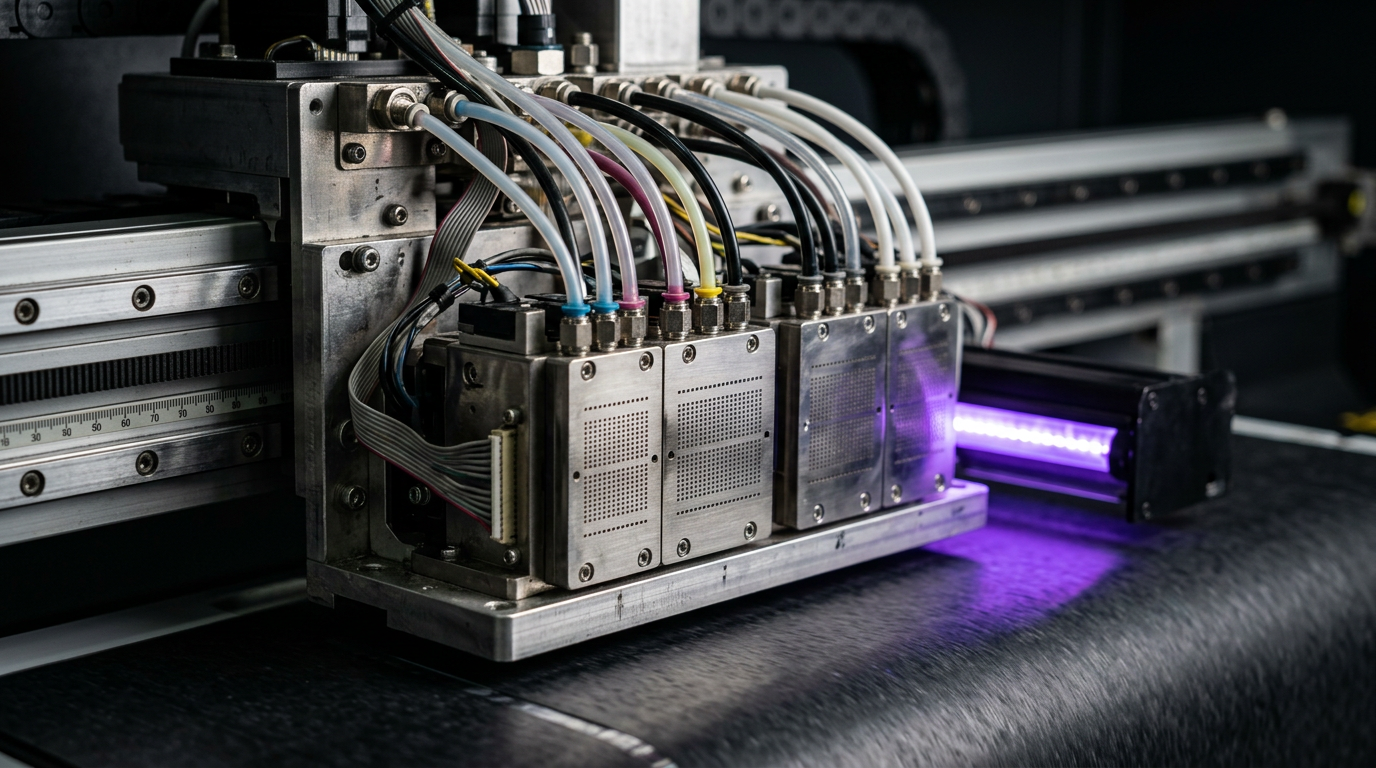
Direct answer: White inks commonly contain pigment particles that can settle over time. Some DTF and UV systems use manufacturer-designed agitation or circulation to help maintain a stable supply. These mechanisms reduce certain risks but do not guarantee maintenance-free operation.
Engineering Principles and Components
| Topic | Function | Practical check |
|---|---|---|
| Settling | Pigment distribution may change during storage or idle periods. | Follow the ink supplier handling and storage instructions. |
| Agitation | Some systems move ink in a reservoir. | Use only the machine-approved method and schedule. |
| Recirculation | Some designs circulate ink along a specified path. | The path and pressure controls differ by head and machine. |
| Nozzle checks | A test pattern helps assess jetting. | Record results and follow approved maintenance procedures. |
Practical Shop Checklist
- Confirm whether your exact model provides agitation, recirculation or neither.
- Follow ink-specific storage, mixing and idle-period guidance.
- Check white layers on actual artwork and intended materials.
- Ask service before changing pressure, flow paths, pump settings or cleaning chemistry.
Why White Ink Behaves Differently
White ink is used when a print needs an opaque or partially opaque light layer. In direct-to-film textile printing it can help colours remain visible on a dark garment. In UV printing it may act as an underbase, an image element or a layer in a multi-layer effect. The actual layer order depends on the printer, artwork, material and intended application.
Many white inks contain pigment particles suspended in a liquid. Over time, particles can settle or the distribution can change, particularly during storage or inactivity. Formulation and equipment design matter, so one product’s handling requirements cannot be assumed to apply to another. Follow the ink and printer suppliers’ instructions for the exact combination in use.
Agitation and circulation are two approaches that some machines use to help manage ink condition. Neither eliminates the need for correct storage, normal maintenance, nozzle checks or a suitable production workflow. A machine’s sales description may not explain the full flow path; request documentation for the installed configuration.
Pigment Settling: A Practical Explanation
White pigment is dispersed in a carrier fluid rather than simply becoming an invisible dissolved colourant. Depending on the formulation and conditions, the distribution of particles may change over time. If ink is not handled according to its supplier’s instructions, the ink presented to the printer may not remain consistent.
This does not mean every variation in white coverage is caused by settling. A missing white nozzle, an incorrect white-layer setting, a different substrate, inadequate adhesion or another process change can also affect the visible outcome. Start by recording the symptoms and checking the actual workflow instead of assuming that a tank needs more movement.
Storage temperature, shelf life, container orientation and preparation instructions are product specific. Use the label, technical data and safety data sheet. Ask the supplier what to do when ink has been stored longer than recommended or exposed to conditions outside its specification. Do not add solvent or another ink to restore consistency without written manufacturer guidance.
Agitation Versus Recirculation
Agitation refers here to a manufacturer-designed method of moving ink in a container or reservoir. Depending on the system, that may involve a mechanism inside the tank or an approved handling step before installation. The required timing and method are not universal. Vigorous shaking, improvised stirrers or altering a machine mechanism may introduce other problems and should not be done without authorisation.
Recirculation means that a system moves ink through a defined route and returns it as designed. The route can differ substantially between machines. A product may circulate ink within or around a tank, through part of the supply system, or through a head specifically designed for that function. Ask the manufacturer where the flow goes and what the operator can check safely.
A machine can use agitation, circulation, both, or neither. A pump running somewhere in a printer does not establish that white ink is circulating at the head. Equally, a printer without a particular feature is not automatically unsuitable if it is designed and maintained for the application. Evaluate the complete system and documented support rather than a single sales term.
Components in a White-Ink System
A white-ink path may include a container, tubing, connectors, a filter, a damper, a pump, valves and the printhead. Some systems add sensors or control functions. The combination and purpose of each component vary by model. For example, a pump used during cleaning may be separate from a circulation pump.
Filters and dampers must be compatible with the ink and system. A physically similar replacement is not automatically suitable. The manufacturer or authorised technician should specify the part and service interval. Opening a fluid circuit can introduce air, cause leaks or expose staff to chemicals, so it should not be treated as a routine experiment.
Pressure conditions at the head are also design specific. Do not change a regulator, pump speed, service parameter or flow path using a value copied from another machine. If a warning appears or the system does not behave as documented, record the exact message and contact the supplier.
White Ink in DTF Printing
In a typical DTF transfer workflow, artwork is printed onto a suitable film using a printer and ink system designed for the process. White is commonly used to support colour visibility when the transfer is applied to a garment. The artwork order and white-layer configuration depend on the RIP, printer and film orientation; follow the instructions for the actual workflow.
After printing, the appropriate adhesive powder and curing process form part of the transfer system. Transfer application then depends on the film, ink, powder, garment and press instructions. A good nozzle pattern or attractive film print does not independently establish wash durability or adhesion on every fabric. Produce and test samples for the intended garment and usage.
If the finished transfer looks weak, investigate the complete sequence. Possible contributors include white-layer settings, white-channel jetting, film, powder application, curing, transfer conditions and fabric. Change one authorised factor at a time and retain the original preset. Do not diagnose an ink-circulation fault solely from the appearance of a finished garment.
White Ink in UV Printing
UV white ink can be used in different positions in a print stack. A white underbase can affect the appearance of colour on a transparent or dark substrate; another workflow may place white differently for the intended viewing side. Layer order and coverage must be set according to the printer, RIP and job requirements.
UV ink must be processed with a compatible curing system and suitable machine settings. Surface appearance or a dry feel alone does not prove complete cure or fitness for an intended use. Adhesion is a related but separate property and depends on the actual substrate, preparation, ink and process. Agree appropriate tests and acceptance criteria with suppliers and the customer.
UV lamps and uncured ink require the manufacturer’s safety controls. Keep guards and interlocks in place, follow the safety data sheets and leave lamp or internal service work to qualified personnel. Do not claim food-contact, dishwasher or outdoor suitability without evidence for the complete intended application.
Symptoms That Need Investigation
| Observation | Possible areas to investigate | First safe action |
|---|---|---|
| Missing white marks in a nozzle check | Jetting, supply, maintenance station or other model-specific issues | Save the test and follow the approved cleaning sequence. |
| White looks less opaque than an approved sample | Layer settings, jetting, ink condition, substrate or viewing conditions | Compare the recorded job settings and test the actual material. |
| White varies during a run | Several possible supply, jetting or workflow factors | Stop affected production, document timing and contact service if needed. |
| White edges extend beyond colour | Artwork preparation, RIP underbase settings or registration | Check the actual file and approved RIP workflow. |
| Ink leak or equipment warning | Fluid or machine fault requiring a model-specific response | Stop safely and follow the manufacturer’s service instructions. |
| Transfer performs poorly after application | Film, powder, cure, press, garment and ink system | Review the complete process and agree a suitable test. |
The table is a starting point, not a diagnosis. Similar symptoms can have different causes, and several causes can occur together. Do not replace a pump, head or filter solely because white appears uneven.
Understanding White Underbase and Choke
An underbase is a white layer placed beneath or otherwise associated with coloured artwork in a print workflow. Its purpose and placement depend on the material and viewing direction. The RIP may let the operator control how the white layer relates to the colour layer. Always check the software documentation, as terminology and controls differ.
A white choke generally reduces or contracts the underbase relative to the coloured artwork to help prevent white showing at the edges. The appropriate value depends on registration, material and design. A spread or expansion is a different operation. Neither should be selected using a universal number copied from another printer.
Inspect fine text, thin strokes and small details after applying an underbase adjustment. Excessive contraction can remove white support from narrow elements; an inappropriate expansion can create an unwanted visible edge. Produce an actual-size proof and check the result after the complete transfer or UV process.
Nozzle Checks and White-Channel Diagnosis
Use the nozzle-check procedure provided for your printer. The test pattern and the way white is made visible can vary with the machine and media. Follow the manual’s recommended material and lighting rather than interpreting a pattern from another model. Label the test with the date, machine and any action taken before it was printed.
A missing mark indicates a jetting symptom, not necessarily a permanently damaged head. Drying, contamination, supply conditions, maintenance-station issues and physical or electrical faults are among the possible causes. Follow the approved recovery procedure and record each result. If the issue persists or returns, request qualified service rather than repeatedly applying stronger cleaning cycles.
Compare the test with the defect in the real job. A normal nozzle pattern does not prove that the white layer is configured correctly or that a transfer will adhere. Equally, a software adjustment will not fix a physical jetting fault. Investigate each part of the workflow with the appropriate test.
A Safe Operator Troubleshooting Sequence
- Stop and describe the issue. Note whether the problem is missing white, uneven opacity, visible edges, a warning or poor end-use performance. Record when it began and which jobs are affected.
- Check for safety concerns. If there is leakage, an electrical warning, a head strike or another hazard, stop safely and follow the manufacturer’s instructions. Do not open guarded areas.
- Record the configuration. Capture the printer model, ink product and batch, substrate or film, RIP preset, white-layer settings and recent maintenance history.
- Save a baseline nozzle check. If the machine is safe to operate, use the specified pattern and media. Keep the original print or a clear labelled photograph.
- Review normal operator indicators. Check the warnings and ink status described in the manual. Do not disconnect lines or change pump and pressure controls.
- Follow authorised recovery. Use only the cleaning or maintenance procedure allowed for the operator. Record actions and respect the manufacturer’s limits.
- Compare and escalate. Print the next approved test. If the issue persists, recurs or requires opening the fluid circuit, provide the evidence to an authorised technician.
- Validate the job. Once the printer meets its documented checks, make a sample using the actual production materials and process. Approve appearance and any relevant end-use test before restarting the full run.
Example: DTF White Coverage Changes
Suppose a shop notices that a repeat garment design looks less vivid than an approved sample. The operator saves a nozzle test and notes the ink batch, film, preset and garment. They compare the white-layer settings and confirm whether the transfer process changed. If the pattern shows missing white marks, they follow the printer’s documented recovery routine.
If jetting is acceptable but the finished result is still different, the shop reviews the RIP, film, powder, cure and press workflow using supplier instructions. They test one authorised change at a time. The example is illustrative: it does not prove that ink settling caused the defect, and it does not prescribe settings for a particular garment.
Example: UV White Appears Uneven on a Rigid Item
A UV shop prints a white-backed design on a coated rigid item and notices uneven appearance. The operator keeps the approved reference, checks the white-channel test and records the exact material and print settings. They also review the fixture, surface preparation and intended viewing side using the equipment and material suppliers’ guidance.
If the test pattern is poor, the team follows the approved maintenance sequence. If jetting is acceptable, they investigate artwork, layer configuration and substrate variation. Adhesion and cure are assessed separately using an agreed method. This is a diagnostic example, not evidence that any particular item or coating is compatible.
Storage, Idle Periods and Restart
Keep ink in its original labelled container or other supplier-approved packaging and observe the storage conditions and shelf life specified for the product. Record opening dates or batch information if recommended. Do not use a generic rule for how often to shake, stir or circulate every white ink.
For planned inactivity, ask the printer and ink suppliers about the approved parking, maintenance and restart procedure. Some systems may have automated routines or require particular preparation. Follow the exact instructions rather than leaving the machine in an improvised state. On restart, carry out the specified checks and retain a baseline pattern.
If ink condition is questionable after storage, contact the supplier. Adding chemicals, mixing products or attempting to revive settled material without instructions can create a more serious compatibility problem. Keep safety data sheets accessible and follow the site’s chemical handling and disposal procedures.
Service and Safety Boundaries
Do not open a white-ink circuit, force fluid through a head, add an external pump or adjust pressure unless the manufacturer has authorised the procedure for your role and equipment. Incorrect work can introduce air, create a leak, damage components or produce an unsafe condition. A trained service engineer should perform restricted tasks using the correct tools and documentation.
Use the protective equipment and spill response specified in the ink and cleaning-fluid safety data sheets. Keep guarding intact and avoid unnecessary contact with uncured UV ink. For a significant spill, electrical fault or situation beyond your training, stop and use the workplace escalation procedure.
Before approving replacement parts, ask the technician what evidence supports the diagnosis, which component is compatible, and what test will be performed after service. Keep the report, nozzle patterns and warranty information with the machine record.
Questions for a Machine Supplier
- Does the installed machine agitate, circulate, both, or neither?
- What is the actual ink flow path, and does it include the printhead?
- Which white inks and cleaning fluids are approved for the installed system?
- What storage, idle-period and restart procedures apply?
- Which nozzle-check media and pattern should the operator use?
- What checks can operators perform without opening the fluid circuit?
- How should white layers and choke be configured in the supplied RIP?
- What service intervals and warranty conditions apply to the relevant parts?
Request written answers and, where possible, a demonstration on the film or substrate you intend to use. Save the approved print preset and physical proof with the job record. A repeatable process is more useful than a claim that circulation alone makes a printer maintenance free.
Related Engineering Guides
Continue with ink delivery components, nozzle dropout diagnosis and UV cure and adhesion testing. Check all settings and safety procedures against the specific equipment and ink documentation.
Related Engineering Guides
Start with how a piezo printhead works and digital inkjet machine anatomy. For a machine-specific question, share your model on our contact page.
Frequently Asked Questions
Why does white ink need special attention?
White inks often contain pigment particles that can settle; the supplier and machine documentation specify how to manage the ink.
Is agitation the same as recirculation?
No. Agitation moves ink in a container, while recirculation moves it through a designed path. A system may use one, both or neither.
Do all DTF and UV printers circulate white ink?
No. Features vary by exact machine and head configuration.
Does circulation eliminate daily checks?
No. Follow the manufacturer’s nozzle-check and maintenance schedule.
Can I add a circulation pump myself?
Do not modify the ink path without manufacturer approval. Pressure and material compatibility can affect the head and warranty.
Why can white ink appear patchy?
Possible causes include supply, nozzle condition, artwork settings or substrate issues. Diagnose using the approved test procedure.
Can textile DTF white ink be used in a UV printer?
No. Textile and UV inks use different chemistries and equipment; use only ink specified for your system.
