

Direct answer: An ink must be compatible with the printhead and with the complete printer system. Ink chemistry, physical properties, materials, curing or drying and approved operating conditions all matter. A printhead name alone is not enough to establish compatibility.
Engineering Principles and Components
| Topic | Function | Practical check |
|---|---|---|
| Chemistry | Textile, sublimation, solvent and UV inks serve different processes. | Do not interchange them without explicit manufacturer approval. |
| Physical properties | The specified formulation must jet correctly under approved conditions. | Follow the head and printer supplier specifications. |
| Materials and seals | Ink contacts tubing, filters, adhesives and other components. | Compatibility must cover the whole ink path, not only the head. |
| Curing or drying | Ink must work with the printer process and intended media. | A UV ink requires the appropriate compatible curing system. |
| Colour management | Profiles depend on the actual ink, media and system. | Use approved profiles and a physical proof. |
Practical Shop Checklist
- Check the exact printer model, installed head, ink formulation and supplier documentation.
- Do not mix brands or chemistries unless the manufacturer explicitly approves a procedure.
- Ask a qualified engineer about conversion, flushing, warranty and disposal before changing inks.
- Test the finished output on the actual media and record the approved configuration.
What Ink Compatibility Actually Means
Ink compatibility means more than whether a liquid can pass through a printhead. A suitable ink must work with the installed head, the complete fluid path, the printer’s controls and maintenance system, and the intended printing process. It also needs to produce acceptable output on the selected substrate under documented operating conditions.
A manufacturer may use a particular head family in several printer configurations. That does not mean any ink advertised for the head family is approved for every printer using it. Tubing, seals, filters, pumps, heating, firmware, waveform settings and maintenance routines can differ. Start with the printer manufacturer’s approved ink list and obtain written clarification for the exact configuration.
Compatibility is not a guarantee of adhesion, colour match or durability on every material. Those properties need appropriate testing in the complete workflow. Likewise, a good-looking short print does not by itself establish long-term reliability or compliance for a special end use.
How Inkjet Droplets Depend on Ink Properties
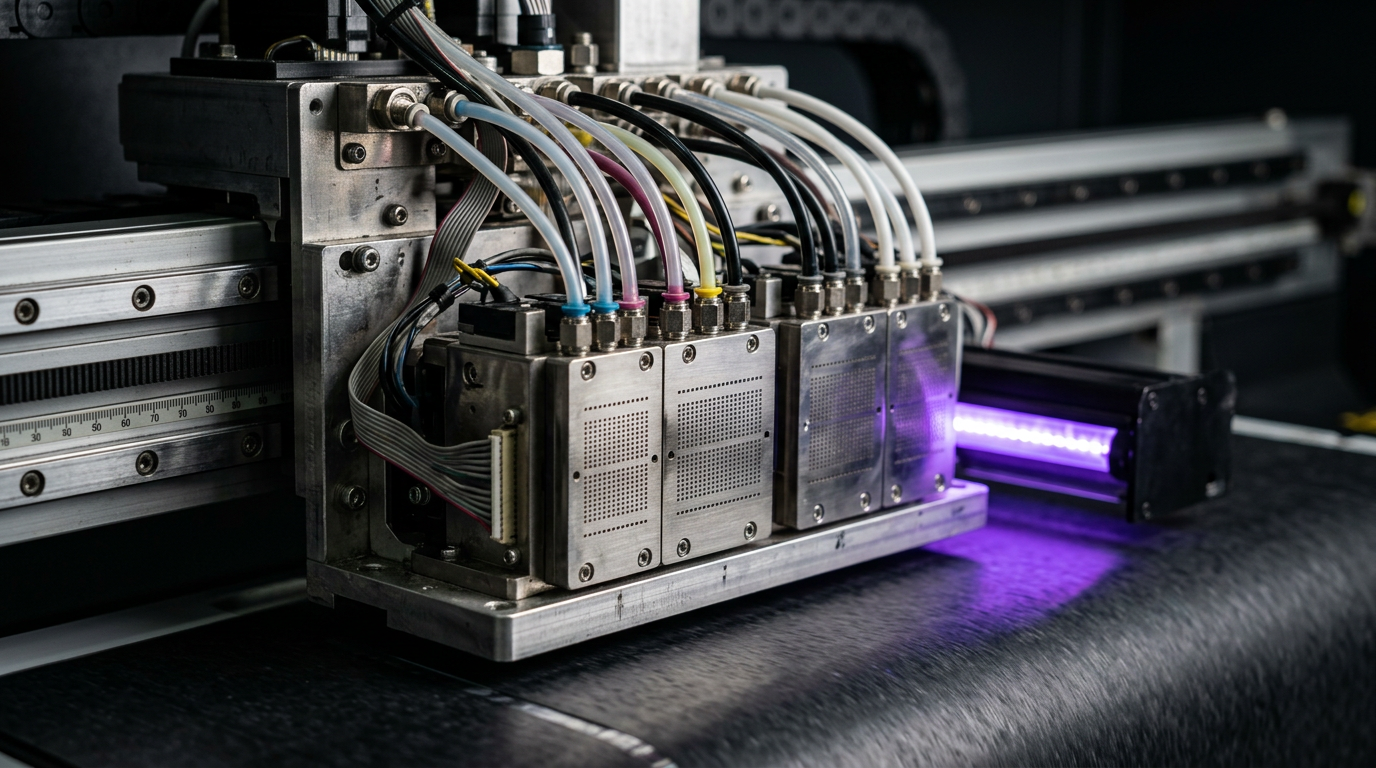
In a piezo inkjet system, an electrical signal drives an actuator that creates a pressure disturbance in ink and ejects a droplet. The head and printer are designed for a particular operating range. The fluid’s physical properties affect how it moves through the supply path, forms a jet and separates into droplets.
Viscosity describes resistance to flow. It can change with temperature, and the acceptable range depends on the head, ink and printer design. Do not assume that a thicker or thinner ink can be corrected by changing a temperature setting. Heating or other adjustments should be made only as specified by the manufacturer.
Surface tension affects how liquid behaves at interfaces, including at the nozzle and on the substrate. It is relevant to drop formation and wetting, but it is not the only property that determines output. Other formulation characteristics, particles, additives and the printer’s drive waveform also matter.
Particle characteristics and stability matter for pigmented inks. Particle size distribution, dispersion and formulation stability are engineered for the intended system. Settling, contamination or incompatible mixing can affect the ink path. An operator should follow supplier handling instructions rather than attempt to assess compatibility by eye.
Why the Whole Ink Path Must Be Compatible
Ink can contact reservoirs, tubing, connectors, valves, filters, dampers, pumps, seals and the printhead. Materials that are suitable for one formulation may not be suitable for another. The printer manufacturer selects components and service procedures as a system. A head manufacturer’s statement alone may not cover every component used by a printer integrator.
Cleaning and maintenance fluids also contact parts of the ink system. A cleaner intended for a different ink chemistry is not automatically safe. Use the specified maintenance materials and procedures. Do not force liquid through a head, open a line or improvise a flush without authorisation and appropriate training.
When evaluating an alternative ink, ask for documentation covering the exact printer model, head configuration and relevant components. Confirm who is responsible for the conversion and for any resulting service issues. A vague claim such as compatible with piezo heads is not a substitute for a model-specific approval.
Common Ink Families and Their Workflows
Aqueous inks: These use water as a major component, but formulations vary widely. Pigment and dye products can be designed for very different heads, media and applications. The term water-based alone does not establish compatibility with a particular printer.
Solvent and eco-solvent inks: These are used in selected signage and graphics systems. Formulations differ in solvents, performance, handling and equipment requirements. Use the exact approved product and consult its safety data sheet and the printer’s ventilation guidance.
UV-curable inks: These require an appropriate curing system designed for the formulation and printer. A UV lamp or LED unit is not automatically compatible with every UV ink. Follow the supplier’s instructions and assess cure and adhesion using suitable methods for the actual application.
DTF textile inks: A direct-to-film workflow uses compatible ink, film, powder and curing and transfer processes. A DTF ink should not be treated as interchangeable with another textile or UV product merely because the printer uses an inkjet head. Confirm the entire process and the manufacturer-approved configuration.
Sublimation inks: These are designed for a dye-transfer workflow using suitable substrates or coatings and an appropriate transfer process. A printer and ink intended for sublimation should not be converted casually to another chemistry. Follow the equipment supplier’s documented approval and procedure.
These categories are broad descriptions, not interchangeable product specifications. Even two inks in the same category can differ in properties, colour behaviour, maintenance and component compatibility. Verify the exact product rather than relying on the family name.
Drying, Curing and the Finished Print
Ink must be processed correctly after deposition. Depending on the system, this can involve drying, UV curing, powder curing or another defined process. Follow the instructions for the ink, machine and substrate. Do not carry a temperature, lamp setting, time or speed from one process to another without supplier approval.
A UV print that feels dry is not automatically fully cured or fit for every end use. Similarly, a DTF transfer that looks acceptable on film must still be applied and evaluated on the intended garment. Adhesion, flexibility, wash performance, environmental exposure and other requirements should be tested using methods agreed with the supplier and customer.
Special claims, including food-contact, skin-contact, dishwasher or outdoor suitability, require evidence appropriate to the complete application. Do not infer such claims from the ink’s name or from a single scratch test. Consult the relevant supplier documentation and a qualified testing body when the application requires it.
How a Change of Ink Can Affect Colour
Different formulations can have different colour characteristics, even when marketed for the same printer class. A saved RIP preset or ICC profile is associated with a specific workflow that includes printer, ink, substrate and settings. A change of ink can make an earlier profile or approved proof less representative.
After an authorised change, ask the supplier what profiling or recalibration is needed. Print a physical proof on the actual substrate and evaluate it under agreed viewing conditions. Keep the artwork version, ink product, material and RIP settings with the approved sample so future jobs can be compared consistently.
A profile cannot repair missing nozzles or make an incompatible ink safe for the machine. Confirm normal jetting and the approved physical configuration before adjusting colour. When several variables change at once, it becomes difficult to identify why a print looks different.
Can You Mix Two Ink Brands?
Do not assume two products can be mixed because they have the same colour or are sold for the same head family. Their formulations, additives or physical behaviour can differ. Mixing may create instability or other problems, and even an apparently normal short test does not establish compatibility over time.
If a supplier proposes changing brands, request a written conversion plan for the exact printer and ink system. The plan should address the existing ink, approved cleaning materials, components, re-priming, tests, disposal, warranty and responsibility for service. A qualified engineer should perform any work requiring access beyond normal operator procedures.
Do not add an unapproved solvent to alter viscosity or use an improvised flush to remove the old ink. Different chemicals can react with ink or system materials. Follow the applicable safety data sheets and local waste requirements, and ask the supplier what to do with unused or contaminated material.
Compatibility Checklist Before Buying Ink
- Identify the printer. Record the exact manufacturer, model, installed head configuration and ink system. Check whether the printer has been modified or converted previously.
- Identify the proposed ink. Record the product name, colour set, formulation version and supplier. Generic labels such as UV ink or textile ink are not sufficient.
- Request written approval. Ask whether the product is approved for this exact printer and head configuration, including the fluid path and maintenance system.
- Check process requirements. Confirm any documented heating, drying, curing, circulation or storage requirements. Do not assume the existing settings are suitable.
- Review safety and warranty. Obtain technical data and safety data sheets. Ask how the change affects equipment warranty, service support and waste handling.
- Plan the change. If approved, agree who will perform the conversion, which parts or fluids are required and how the system will be checked before production.
- Validate output. Run the supplier’s approved tests, create a physical colour proof and evaluate end-use requirements on the actual substrate.
- Document the baseline. Retain the approvals, invoice, batch details, test patterns, RIP preset and customer-approved sample.
Questions to Ask the Ink Supplier
- Is this exact product approved for my printer model and installed printhead configuration?
- Has compatibility been assessed for the complete ink path, including seals, filters, dampers and pumps?
- Which maintenance fluids and procedures are approved?
- Does a conversion require a qualified engineer or replacement parts?
- What operating, storage and idle-period instructions apply?
- What documentation supports the ink’s intended substrate and end use?
- What colour profile or calibration is recommended for the actual mode and media?
- Who provides service and warranty support if a problem occurs after conversion?
Keep the answers in writing. If the printer maker and ink supplier provide conflicting guidance, resolve that conflict before changing the ink. A general assurance from a reseller should not replace documentation for the installed machine.
Symptoms That Can Be Mistaken for Ink Incompatibility
| Symptom | Other possible factors | Safe first check |
|---|---|---|
| Missing nozzle marks | Drying, maintenance station, supply, contamination or electrical fault | Save a nozzle check and follow the manufacturer’s recovery sequence. |
| Colour shift | Profile, substrate, jetting or lighting change | Compare the recorded configuration and approved proof. |
| Poor adhesion | Surface, preparation, cure or intended-use conditions | Test the actual material using an agreed method. |
| Uneven white coverage | White-layer settings, jetting, handling or substrate | Check the pattern and recorded workflow. |
| Leak or damaged component | Several possible mechanical or material causes | Stop safely and request qualified inspection. |
These observations do not rule out incompatibility. They demonstrate why a symptom alone is not proof. Record the timing of any ink change and provide the supplier with product identifiers, test patterns and the service history.
Example: Evaluating an Alternative UV Ink
Imagine a shop is offered a lower-cost UV ink described as suitable for its head family. Before purchasing it for production, the shop identifies the exact printer, head and existing ink. It requests written confirmation covering the complete fluid path, the UV curing system and the service procedure for conversion.
The shop also asks how the new ink affects profiles, warranty and intended applications. If the suppliers approve a conversion, qualified personnel follow the documented process. The shop then creates a new physical proof and agrees suitable cure, adhesion and end-use testing. This example is a decision framework, not a recommendation to convert or a claim that any particular ink will work.
Example: Repeat Textile Job After a Supply Change
A textile shop sees a colour difference after changing a container of an approved ink. The operator records the product and batch, compares the previous proof, confirms the RIP preset and prints the recommended nozzle check. The team also checks whether the film, powder or garment changed.
If the product is not the same approved formulation, the shop stops and asks the supplier for guidance. If it is the same product, the difference still requires investigation: a batch, workflow or machine condition may be relevant, but none should be blamed without evidence. The team retains samples and avoids changing several variables at once.
Handling, Storage and Operator Safety
Store ink in accordance with the manufacturer’s instructions and observe its shelf life. Keep containers labelled and avoid contaminating supplies. Some products need specific preparation before use; follow the product instructions rather than shaking, heating or filtering ink by guesswork.
Read the safety data sheet for each ink and maintenance fluid. Use the required protective equipment and ventilation specified by the supplier and workplace procedures. Keep guards and interlocks in place. For leaks, electrical warnings or exposure incidents, stop safely and follow the site’s emergency and escalation process.
Dispose of waste ink, used containers and cleaning materials according to applicable local requirements and the product guidance. Do not pour unknown chemicals into drains or mix waste streams without the site’s approved procedure.
When to Involve an Engineer
Contact qualified service when a conversion requires opening fluid lines, replacing components, changing service parameters or performing electrical work. Also escalate recurring nozzle dropout, a head strike, a leak or a fault that continues after the approved user-level procedure.
Provide the printer and head configuration, ink identifiers, dated test patterns, error messages and a list of actions already taken. Ask for a written explanation of the diagnosis and the test used to verify the repair. A head replacement should not be approved solely because an unverified ink or a single bad print is suspected.
Related Guides
Read our guides to piezo printhead operation, ink delivery components, and UV cure and adhesion testing. Use the documents for your exact equipment as the authority for settings and service.
Related Engineering Guides
Start with how a piezo printhead works and digital inkjet machine anatomy. For a machine-specific question, share your model on our contact page.
Frequently Asked Questions
Can I put UV ink into a textile DTF printer?
No. They are different systems and inks. Use only a configuration explicitly supported by the equipment manufacturer.
Is matching the printhead model enough?
No. The entire printer ink path, control system, curing method and approved ink formulation must be compatible.
Can two inks be mixed if they look alike?
Do not assume so. Ask the manufacturer about compatibility and an authorised changeover procedure.
Why does ink affect jetting?
The head and printer are designed for inks with specified physical and chemical properties under specified operating conditions.
Does the right ink guarantee adhesion on every material?
No. Substrate, preparation, cure and the intended use all affect adhesion; test the actual item.
What should I document before switching ink?
Record the current and proposed products, model and head, supplier approval, changeover procedure, warranty terms and test results.
Who should perform a conversion?
A qualified technician following the equipment and ink manufacturers’ approved instructions.
