

Direct answer: In the i3200 A1 vs U1 vs E1 comparison, all three are the same Epson PrecisionCore MicroTFP printhead on the outside: 3,200 nozzles in 8 rows, 600 npi resolution over two rows, a 33.8 mm print swath and up to four colours per head. The difference is inside. The i3200-A1 is built for water-based (aqueous) inks such as sublimation, DTF and textile pigment. The i3200-U1 is built for UV-curable inks, which are thicker and chemically aggressive. The i3200-E1 is built for eco-solvent and mild-solvent inks used in signage. Choose the head by the ink your machine runs, not by price or availability. A head fitted with the wrong ink family can clog, shift colour or fail permanently, and suppliers usually treat that as misuse rather than a warranty claim.
If you are buying a replacement head, upgrading an XP600 machine or converting a printer to a new ink, this guide shows exactly which i3200 version belongs in your machine and why.
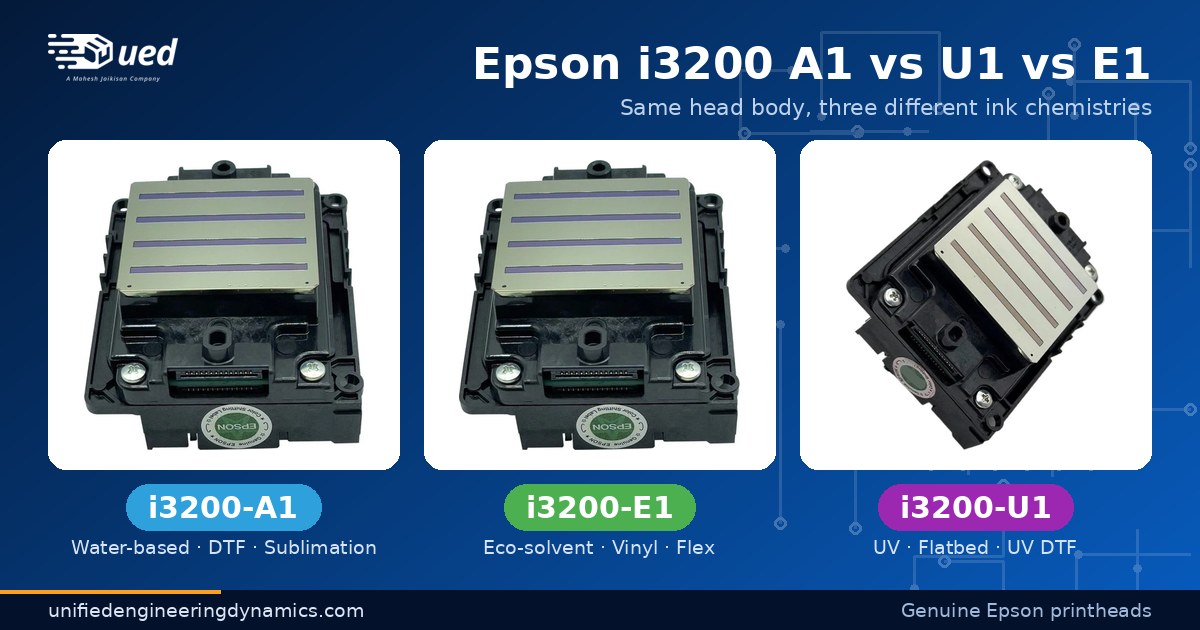
Table of Contents
The i3200 Family: One Body, Three Chemistries
Epson designed the i3200 as an industrial head for printer manufacturers. It is much faster and more durable than the consumer-derived XP600 and DX5 heads that dominated small-format and entry-level wide-format machines for years. To serve different markets, Epson builds the same head body in versions matched to particular ink chemistries. The suffix tells you which one you are holding: A for aqueous, U for UV and E for eco-solvent.
The physical footprint, nozzle layout and connector are common across the three, which is exactly why mix-ups happen. A technician can mount any of them in the same carriage slot, connect the same cables and see the head respond. The problems appear later, sometimes within hours and sometimes over weeks, as the ink attacks materials it was never meant to touch.
| Shared specification | Value (all three versions) |
|---|---|
| Technology | PrecisionCore MicroTFP (thin-film piezo, MEMS manufactured) |
| Nozzles | 3,200 (8 rows of 400) |
| Nozzle pitch per row | 1/300 inch (300 npi per row, 600 npi over 2 rows) |
| Effective print width | 33.8 mm (1.33 inches) |
| Colours per head | Up to 4 (two rows per colour) |
| Size and weight | About 69.1 x 59.4 x 35.6 mm, about 82 g |
| Grayscale | Binary, 3-level and 4-level variable droplet modes |
For a wider view of where this head sits in the market, read our Epson i3200 printhead buying guide, which covers variants and pricing in India.
i3200 A1 vs U1 vs E1 at a Glance
The table below summarises the practical differences that matter to a print shop owner or service engineer. The droplet and viscosity values come from Epson’s published datasheet figures for the three versions.
| Feature | i3200-A1 | i3200-U1 | i3200-E1 |
|---|---|---|---|
| Ink family | Water-based: sublimation, DTF, dye, pigment | UV-curable (hard, flexible, white, varnish) | Eco-solvent and mild solvent |
| Ink viscosity window | 3–4 mPa·s | 5–7 mPa·s | 3–4 mPa·s |
| Binary droplet | 6 pl at 43.2 kHz | 5 pl at 43.2 kHz | 6 pl at 43.2 kHz |
| 4-level grayscale droplets | 3.8, 6.1, 9.4 pl | 3.8, 6.2, 9.3 pl | 3.8, 5.5, 8.7 pl |
| Typical machines | Sublimation, DTF film, DTG, textile and paper printers | UV flatbed, UV roll-to-roll, UV DTF, hybrid UV | Eco-solvent signage, vinyl, flex and photo printers |
| Typical media | Polyester, transfer paper, PET film, cotton (pretreated), wallpaper | Acrylic, glass, metal, wood, PVC, PET, backlit film, leather | Self-adhesive vinyl, flex banner, backlit, one-way vision, canvas |
| Main risk if misused | Swelling and delamination with solvent or UV ink | Curing inside the head if exposed to stray light | Damage from UV ink; poor jetting with water inks |
The key line is viscosity. UV inks are thicker, so the U1 is designed and driven for a higher viscosity window, and UV machines warm the ink to bring it into range. A1 and E1 work with thinner inks, but the chemistry differs: water on one side, glycol-ether based solvents on the other.
i3200-A1: The Water-Based Head
The A1 is the head for aqueous systems. Its internal adhesives, seals and nozzle plate coating are chosen to resist water, humectants and the surfactants used in water-based inks, but they are not designed to withstand solvents or UV monomers.
- Sublimation printing on transfer paper for polyester sportswear, flags, mugs and soft signage.
- DTF (direct-to-film) printers that lay water-based pigment colour and white ink onto PET film before powder and curing.
- DTG and textile pigment machines printing directly on garments or fabric.
- Water-based paper printing such as posters, wallpaper and photo papers designed for aqueous ink.
A1 heads are popular in two- and four-head DTF and sublimation machines because they offer far more speed than XP600-based designs while keeping fine detail. White ink in DTF needs circulation or regular agitation, so pair an A1 machine with a sound white-ink system. If you are choosing a DTF head, our comparison of the best printhead for DTF and T-shirt printing sets the i3200 against i1600 and XP600 options.
Water-based inks dry at the nozzle more readily than solvent inks when a machine sits idle. A1 machines therefore depend on a well-sealed capping station, regular nozzle checks and stable room humidity. Our sublimation printer maintenance schedule applies equally to A1-based sublimation machines.
i3200-U1: The UV Head
UV-curable inks contain monomers, oligomers and photoinitiators that harden when exposed to ultraviolet light. They are thicker than water or eco-solvent inks and are more aggressive towards adhesives and plastics. The U1 is built with materials that tolerate this chemistry and is specified for the higher 5–7 mPa·s viscosity window.
- UV flatbed printers for acrylic, glass, metal, wood, PVC foam board, phone covers and promotional gifts.
- UV roll-to-roll printers for soft film, backlit film, PET, PP, wallpaper and leather.
- UV DTF (cold transfer sticker) printers that print colour, white and varnish on film.
- Hybrid UV machines that handle both rigid boards and roll media.
UV printers usually run white and varnish channels alongside CMYK, so U1 machines often have three or more heads. The ink is warmed by a head heater or heated ink path so it flows within the specified viscosity range. The biggest enemy of a U1 head is stray UV light: reflections from glossy media or a lamp set too close can cure ink on the nozzle plate. Lamp shielding, correct head height and a clean capping station all protect the head.
For UV machine owners weighing head options, see our UV printer printhead comparison of Epson i3200-U and Ricoh Gen5 and Gen6 and the guide to hybrid UV printer heads.
i3200-E1: The Eco-Solvent Head
Eco-solvent inks use milder solvents than true solvent inks, but they still dissolve many plastics and adhesives used in water-based heads. The E1 uses solvent-resistant materials and is the standard head in modern eco-solvent wide-format printers in India, from 1.6 m and 1.8 m vinyl machines to 3.2 m multi-head signage printers.
- Self-adhesive vinyl for shop signage, vehicle graphics and wall branding.
- Flex and backlit banners for indoor and short-term outdoor use.
- One-way vision, canvas and photo media for retail and decor.
- Posters and display graphics that need water and fade resistance after printing.
Compared with the older DX5, the E1 offers far higher throughput per head and stable output at production speeds. If you are moving up from older heads, our articles on Epson i3200 vs DX5 and Epson i3200 vs XP600 explain the trade-offs in cost, speed and head life.
E1 heads are not intended for UV inks. Even where an E1 appears to jet UV ink at first, the chemistry and viscosity mismatch shortens head life and raises the risk of blocked channels.
Why the Three Versions Are Not Interchangeable
Because the heads look identical, it is tempting to treat them as one part with three labels. They are not. Several hidden differences decide whether a head survives in a given ink.
- Wetted materials: adhesives, seals, filters and internal coatings are chosen for one ink chemistry. Solvents and UV monomers can soften or swell materials designed for water-based ink.
- Viscosity and drive conditions: the U1 is specified for thicker ink and is driven with conditions suited to it. A head driven outside its designed viscosity range jets poorly, misdirects drops or misses nozzles.
- Waveforms and voltage: controller boards load a waveform and voltage profile for the head type and ink. The wrong profile can cause satellites, weak firing or overheating.
- Nozzle plate behaviour: the way ink wets the nozzle plate affects wiping, puddling and drop direction, and this behaviour is tuned per chemistry.
- Warranty terms: suppliers commonly reject claims when a head has been used with an ink family other than the one it was sold for.
The rule is simple: the letter on the head must match the ink in the tank. Choosing between them is never about which is “better”; it is about which matches the chemistry.
Droplet Size and Grayscale: What the Numbers Mean
All three versions support variable droplet sizes, often called grayscale or VSDT. In binary mode a head fires one drop size at the highest frequency, which suits fast production. In 3-level and 4-level modes the head mixes small, medium and large drops at a lower frequency, which gives smoother gradients and less grain in skin tones and light areas.
| Mode | i3200-A1 | i3200-U1 | i3200-E1 |
|---|---|---|---|
| Binary | 6 pl at 43.2 kHz | 5 pl at 43.2 kHz | 6 pl at 43.2 kHz |
| 3-level grayscale | 6.3 and 12.3 pl at 21.6 kHz | 6 and 12.5 pl at 21.6 kHz | 6.3 and 12.3 pl at 21.6 kHz |
| 4-level grayscale | 3.8, 6.1, 9.4 pl at 21.6 kHz | 3.8, 6.2, 9.3 pl at 21.6 kHz | 3.8, 5.5, 8.7 pl at 21.6 kHz |
In practice the differences between versions are small. Image quality depends far more on the RIP profile, pass count, ink quality, media and head alignment than on these fractions of a picolitre. Use these figures to understand the head, not to pick a version; the ink decides the version.
Matching the Head to Your Board and Software
An i3200 head needs a compatible controller system, usually from Hoson, Senyang or another board maker, plus the right head board, cables and software settings. When you replace or upgrade a head, check these points:
- Board support: confirm the main board and head board support i3200 heads and the number of heads you plan to run.
- Head type setting: select the correct head model and ink type in the printer software so the right waveform loads.
- Voltage: set the head voltage according to the supplier’s instructions and the values printed on the head where applicable. Our guide to head voltage settings on the fire board explains why this matters for head life.
- Board version: older boards may need updates or replacement. See fire board compatibility for i3200, XP600 and DX5.
- Locked or unlocked: some heads are supplied locked to particular systems, while others are sold unlocked for general integration. Ask the supplier which type you are buying and whether your board needs any decryption hardware.
Moving an XP600 machine to i3200 is a board-level job, not a simple head swap. Our article on the XP600 to i3200 board kit upgrade lists the parts involved.
Quick Selection Guide by Job
Use this table when a customer, technician or supplier asks which head to order. Start from the ink and the work, and the i3200 A1 vs U1 vs E1 choice follows naturally.
| Your work | Ink system | Correct head |
|---|---|---|
| Sportswear, flags and mug transfers | Sublimation (water-based) | i3200-A1 |
| DTF T-shirt transfers | Water-based pigment with white | i3200-A1 |
| Acrylic, glass, metal or gift printing | UV-curable | i3200-U1 |
| UV DTF stickers | UV-curable with white and varnish | i3200-U1 |
| Backlit film and soft film on a UV roll machine | UV-curable | i3200-U1 |
| Vinyl stickers, car graphics, flex banners | Eco-solvent | i3200-E1 |
| Canvas, photo and poster media for signage | Eco-solvent | i3200-E1 |
If you are not sure which ink your machine uses, check the ink bottles, the machine’s specification sheet or the RIP media profiles. Do not guess from the media alone: vinyl, for example, can be printed with eco-solvent, UV or latex systems.
What Happens When the Wrong Head Is Fitted
Mismatches usually show up as problems that look like ordinary clogging at first. That makes them easy to misdiagnose and expensive to chase.
| Mismatch | Typical symptoms |
|---|---|
| A1 head with eco-solvent ink | Gradual nozzle loss, ink seepage, leaks around the head body, sudden failure |
| A1 or E1 head with UV ink | Unstable jetting, missing nozzles, cured or gelled ink in channels, permanent blockage |
| U1 head with water-based ink | Poor drop formation, misdirected drops, colour shift and banding |
| Correct head, wrong software head type | Satellites, weak firing, grainy output, heat build-up |
If a newly fitted head deteriorates quickly, stop printing and confirm the head version, ink type and software settings before buying another head. Many repeat failures are blamed on head quality when the real cause is a mismatch or a faulty board.
Converting a Printer to a Different Ink
Changing ink family means changing far more than the head. Ink residues left in the system will contaminate the new head, and parts that touch ink may not be compatible with the new chemistry.
- Confirm the machine’s boards, heaters and curing system can support the new ink. UV conversion, for example, needs UV lamps and suitable shielding.
- Replace the head with the correct version for the new ink.
- Replace ink tubes, dampers, filters, capping station parts and wipers that touched the old ink.
- Flush or replace sub-tanks and ink pumps according to the ink supplier’s instructions.
- Load the correct head type, waveform and voltage settings.
- Build new colour profiles in the RIP for the new ink and media.
- Run test prints and nozzle checks over several days before taking customer work.
For many shops, buying a machine designed for the target ink is cheaper and safer than converting an existing one. Get a written quotation for all parts and labour before deciding.
How to Identify the Head You Have
Before ordering a replacement, confirm what is installed. The version letter is normally printed on the head label, and the original invoice or machine specification should state it. Your printer software often shows the configured head type as well.
- Photograph the head label before removing the head.
- Check the machine documentation and ink type.
- Note the board maker, board version and number of heads.
- Ask the machine supplier to confirm the version in writing.
You may also see “HD” versions of i3200 heads advertised for higher resolution configurations, and the smaller Epson i1600 is offered in matching A1, E1 and U1 versions. The same principle applies to all of them: match the version to the ink.
Genuine, Refurbished and Compatible Heads
Genuine new heads give the most predictable results and usually carry a supplier warranty with conditions. Refurbished or pulled heads are cheaper but come with uncertain history, including which ink they were used with. A refurbished head that previously ran the wrong ink may already be damaged.
| Option | Advantages | Risks |
|---|---|---|
| Genuine new | Known condition, clear version, warranty | Highest upfront cost |
| Refurbished | Lower price | Unknown history, short or no warranty |
| Used or pulled | Lowest price | Possible wrong-ink exposure, hidden nozzle damage |
Ask for a nozzle check printed with the head before dispatch where possible, and confirm the return policy for installed heads. Many suppliers do not accept returns once a head has been inked.
Price in India and Running Cost
On our store, genuine Epson i3200-A1, Epson i3200-U1 and Epson i3200-E1 heads are each listed at ₹92,000. Market prices vary with supply, import costs and whether a head is locked or unlocked, so confirm the current price and version before ordering.
The bigger cost is downtime and wasted heads. A head that fails because of the wrong ink, a wrong voltage setting or a faulty board is a complete loss. Budget for proper installation, good dampers and wipers, stable power and quality ink. These protect the investment far better than chasing the cheapest head.
Care Tips for Each Version
| Head | Daily care priorities |
|---|---|
| i3200-A1 | Keep the capping station sealed, run nozzle checks, control humidity, agitate or circulate white ink, avoid long idle periods |
| i3200-U1 | Keep stray UV light away from the nozzle plate, keep head heaters at the set temperature, clean the capping station, shield lamps properly |
| i3200-E1 | Use solvent-resistant wipers and caps, use the cleaning fluid matched to the ink, ventilate the room, keep dust off the media |
Whatever the version, use only the cleaning fluid recommended for your ink. A cleaning fluid designed for one chemistry can damage a head built for another, just as the wrong ink can.
Buying Checklist Before You Order
- Confirm the ink family your machine uses.
- Order the matching version: A1 for water-based, U1 for UV, E1 for eco-solvent.
- Check board support, head count and software head type setting.
- Ask whether the head is locked or unlocked for your system.
- Confirm genuine, refurbished or used status in writing.
- Check warranty conditions and return policy for installed heads.
- Replace dampers and check cables when fitting a new head.
- Set the correct voltage and run test prints before production.
More i3200 Guides
- Epson i3200 vs i1600 printhead: speed, cost and which machines use each.
- Epson i3200 HD printhead explained: A1HD and S1HD vs the standard head.
- i3200 printhead installation guide: fitting a new head safely.
- i3200 nozzle clogging: causes, fixes and prevention.
- i3200 printhead cleaning: safe methods and the right fluid.
- Refurbished i3200 printheads: risks and tests before buying.
Further reading: for background on how piezoelectric heads place drops on media, see Wikipedia’s overview of inkjet printing.
Key Takeaways
- The i3200-A1, U1 and E1 share the same body, nozzle layout and print width.
- A1 is for water-based inks, U1 for UV-curable inks and E1 for eco-solvent inks.
- Internal materials, viscosity range and drive settings differ, so the heads are not interchangeable.
- Wrong-ink use causes clogging, colour shift and permanent damage, and is usually not covered by warranty.
- Always match the head version, software head type and voltage to the ink system.
Our Verdict
The question of i3200 A1 vs U1 vs E1 is not about which head is best. It is about which head matches your ink. For sublimation and DTF, fit the A1. For UV flatbed, UV roll-to-roll and UV DTF, fit the U1. For eco-solvent signage and vinyl, fit the E1. Get that match right, set the board and voltage correctly, and the i3200 will deliver the speed and quality that make it the standard industrial head in its class.
Frequently Asked Questions
Can I use an i3200-E1 head with UV ink?
It is not recommended. The E1 is designed for eco-solvent ink and a lower viscosity range. UV ink can damage internal materials and cure inside the head, and suppliers normally treat this as misuse rather than a warranty fault.
Is the i3200-A1 suitable for DTF printing?
Yes. DTF printers that use water-based pigment inks, including white, normally use the i3200-A1. Make sure the white ink is circulated or agitated regularly to prevent settling.
What is the main difference between i3200-U1 and i3200-E1?
The U1 is built for UV-curable inks, which are thicker and need a higher viscosity window, while the E1 is built for eco-solvent inks. The body and nozzle layout are the same, but internal materials and drive settings differ.
Can I convert my eco-solvent printer to UV by fitting a U1 head?
Not by changing the head alone. A UV conversion also needs UV curing lamps, suitable shielding, a compatible ink path, new dampers and tubes, correct software settings and new colour profiles. Buying a machine designed for UV is often more practical.
How do I know which i3200 version is in my printer?
Check the label on the head, the original invoice, the machine specification sheet and the head type selected in the printer software. If you are still unsure, ask the machine supplier to confirm in writing before ordering.
Are i3200-A1, U1 and E1 the same price?
On our store all three genuine versions are listed at the same price. Market prices vary with supply and whether the head is locked or unlocked, so always confirm the version and current price before ordering.
Does the i3200 version affect print quality?
Only slightly. Droplet sizes differ by small amounts between versions, but print quality depends much more on the RIP profile, ink, media, pass count and head alignment. Choose the version for ink compatibility, not quality.
