



Direct answer: In the XP600 vs TX800 comparison, both Epson heads have the same basic layout: 1,080 nozzles in 6 rows of 180, 180 npi per row (360 npi over two rows) and up to six ink channels, in a small, light body. Both started life in Epson desktop printers and are now used in Chinese-built eco-solvent, DTF, sublimation and UV machines. The practical differences are in reputation and support. The XP600 is the more widely supported head on current boards and is known for fine detail, which makes it the default in small DTF and eco-solvent machines. The TX800 is often preferred for small UV flatbeds and is commonly reported to be slightly more robust. At the UED store both cost about ₹38,000. They are not plug-and-play swaps: the board and head settings must match the head. For serious production, both are outclassed by the i3200.
If your quote offers a choice between an XP600 and a TX800 machine, or you need a replacement head, this guide explains what really differs and what does not.
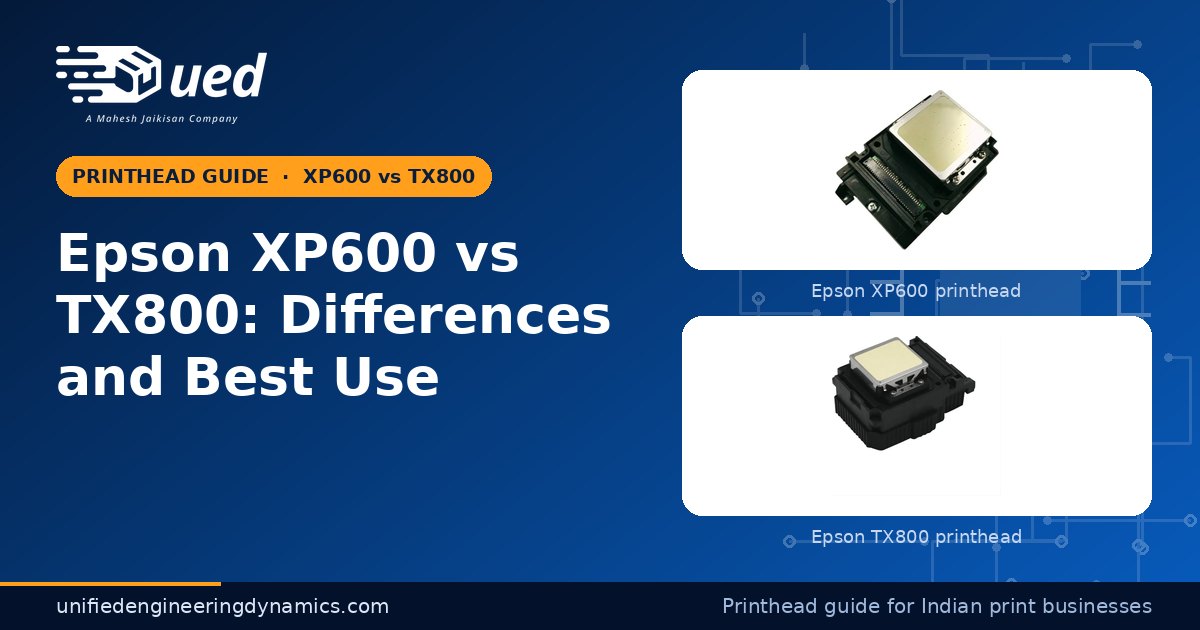
Table of Contents
Where the Two Heads Came From
The XP600 head comes from Epson’s Expression Premium XP-600 desktop printer, and in the trade it is also called DX9 or DX11. The TX800 head comes from Epson’s Stylus TX800FW and related office printers and is also called DX8 or DX10. Both were designed for water-based ink in consumer printers. Chinese machine makers adopted them for wide-format printers because they are small, affordable and widely available, and then paired them with eco-solvent, UV, DTF and sublimation inks.
Because neither head was designed for solvent or UV inks, head life in these machines depends heavily on ink quality and maintenance. This is the main reason both are considered entry-level heads compared with industrial heads such as the i3200.
How to Identify Which Head You Have
Before ordering a replacement, confirm the head model rather than relying on the machine’s name. The two heads look similar at a glance, so check carefully.
- Read the label or code on the head body and the box it came in.
- Check the machine’s control software, which usually shows the configured head type.
- Look at the head board model on the carriage, which is made for a specific head.
- Ask the machine supplier for the original configuration sheet.
- Take clear photos of the head, cables and head board to send to your supplier.
Colour Channel Configurations
With six channels per head, machine makers assign colours in different ways. How channels are used affects speed and what the machine can print.
| Configuration | Channel use | Typical machine |
|---|---|---|
| CMYK + LC + LM | Six-colour photo printing | Sublimation, photo eco-solvent |
| CMYK + 2 × white | White on two channels | DTF, UV with white |
| CMYK + white + varnish | Spot white and gloss | Compact UV printers |
| Doubled CMYK channels | Some colours on two rows for speed | Eco-solvent machines |
| 2 heads: one CMYK, one white/varnish | Separate colour and white heads | DTF and UV flatbeds |
White ink settles and is the most common cause of clogs in DTF and UV machines, whichever head is fitted. Our DTF maintenance schedule covers white ink care.
XP600 vs TX800: Specification Comparison
| Specification | Epson XP600 | Epson TX800 |
|---|---|---|
| Trade names | DX9, DX11 | DX8, DX10 |
| Nozzles | 1,080 (6 rows × 180) | 1,080 (6 rows × 180) |
| Nozzle resolution | 180 npi per row, 360 npi over 2 rows | 180 npi per row, 360 npi over 2 rows |
| Ink channels | Up to 6 | Up to 6 |
| Print width per row | About 1 inch (25.4 mm) | About 1 inch (25.4 mm) |
| Typical inks in wide-format use | Eco-solvent, DTF, sublimation, UV | UV, eco-solvent, sublimation, DTF |
| Body | Small, light module | Small, light module |
| Price at UED store | ₹38,000 | ₹38,000 |
Nozzle layout figures are consistent across specification sources: Tanyu, for example, notes that both heads use six lines of 180 nozzles for 1,080 in total. You will also see conflicting droplet and frequency numbers online, because many sellers copy one spec sheet for both heads, and one comparison even lists the TX800 with 2,400 nozzles. Treat any listing that claims large differences in nozzle count with caution.
Print Quality
With identical nozzle counts and resolution, print quality from either head is very close when ink, RIP profile and calibration are good. In everyday Indian use, many technicians say the XP600 gives slightly finer detail and smoother light tones, which is why it is popular for DTF transfers, photo stickers and small-format eco-solvent work. The TX800 delivers very similar quality and is widely used in desktop and A3 UV printers. Differences you see in practice usually come from the machine, profile and ink rather than the head itself.
One UV printer maker, Yowill, fits the TX800 across its A4, 3360, 5060, 6040 and 6090 UV models and offers XP600, i3200, TX800 or Ricoh options on larger machines, showing how the TX800 has become a standard choice for compact UV printers.
Speed
Both heads lay down similar amounts of ink per pass because they have the same number of nozzles and the same width. A machine’s actual speed depends on head count, pass mode, carriage speed and how colours are assigned to the six channels. If speed matters, compare machines with the same number of heads and the same pass mode, or move to an i3200 machine, which roughly triples nozzle count per head. Our guide to Epson i3200 vs XP600 shows how large that jump is.
Head Life and Durability
Neither head is built for heavy industrial duty. With good ink, filtration and daily care, both can give a reasonable working life in light to moderate use; with poor ink or neglect, either can fail in weeks. The TX800 is often described by technicians as a little more robust in UV use, while the XP600 is more common in eco-solvent and DTF where its wide support makes replacement easy. Whichever you choose, life depends far more on these factors than on the model:
- Genuine, compatible ink from a reliable supplier.
- Good ink filters and dampers.
- Daily nozzle checks and gentle cleaning.
- Proper capping when idle.
- Correct head voltage and a healthy head board.
- For UV, shielding against reflected lamp light.
Our guides to printer dampers and capping stations cover the parts that protect the head.
Board and Electronics Compatibility
The XP600 and TX800 look similar but should not be treated as interchangeable. Head boards, firmware and voltage tables are set up for a specific head. Some board systems support both heads with the correct head board version and settings, while others support only one. Fitting the wrong head without changing settings risks poor output or damage. Always confirm with your board supplier before swapping. Our guides to fire board compatibility and Hoson, Senyang and BYHX carriage boards explain how head and board must match.
XP600 vs TX800 by Application
| Application | Common choice | Notes |
|---|---|---|
| Small eco-solvent vinyl printers | XP600 | Widely supported, easy to replace |
| A3 and 60 cm DTF printers | XP600 | Fine detail, common kits |
| Desktop and A3 UV printers | TX800 | Popular in compact UV machines |
| Small UV flatbeds (60 × 90 cm) | TX800 or XP600 | Both used; i3200 for higher output |
| Sublimation | Either | Choose by machine support |
| Production volume | Neither | Move to i3200 |
For UV flatbed upgrade paths, see our guide to UV flatbed head upgrades from XP600 to i3200 and Ricoh.
Price in India
| Head | UED store price | Product page |
|---|---|---|
| Epson XP600 | ₹38,000 | XP600 printhead |
| Epson TX800 | ₹38,000 | TX800 printhead |
Prices may change, so get a quotation before buying. Much lower prices online usually mean refurbished, used or non-genuine heads. Our TX800 printhead price guide discusses price ranges in more detail.
Genuine, Refurbished and Locked Heads
Both heads are sold in several conditions: genuine new, refurbished, pulled from used printers and non-genuine. Some heads in the market are labelled as “first locked”, “second locked” or “unlocked”, which refers to whether a decoder or matching board is needed. Ask the seller exactly which version you are buying and whether it works with your board without a decoder. Our guide to buying genuine printheads lists checks before payment.
Environment and Head Life
Both heads have small nozzles that dry out or clog quickly in poor conditions. Dust, very low humidity and heat in summer all shorten head life. Keep the printer in a clean room, away from direct sunlight and fans blowing across the carriage, and maintain moderate humidity, especially for water-based DTF and sublimation inks. In the monsoon, protect electronics from damp and use proper earthing; power surges damage head boards and heads alike. Our guide to power fluctuation, UPS and earthing explains protection.
Running Cost
Head price is similar, so running cost depends on how long each head lasts in your conditions and how much ink each print uses. Since both heads have the same nozzle layout, ink use per print is similar for the same RIP settings. The bigger cost differences come from ink quality, cleaning frequency and how often a head fails. A shop that changes heads every few months because of poor ink spends far more than one that buys good ink and maintains the printer daily. See our guide to printhead running cost and lifespan.
Spares Worth Keeping
Keep a spare set of dampers, a capping station, wiper blades, a head cable and cleaning fluid on the shelf. These small parts cost little compared with a new head and often solve problems that look like head failure.
Installing a Replacement Head
- Confirm the exact head model your board is set for.
- Switch off power and wear an anti-static strap.
- Fit the head carefully and connect cables fully and straight.
- Prime ink slowly with new dampers if the old ones are worn.
- Set head voltage values for the new head in the control software.
- Run a nozzle check, then head alignment and bidirectional calibration.
Our guide to printhead alignment explains the calibration steps.
Ink Compatibility in Practice
| Ink type | XP600 | TX800 | Main risk |
|---|---|---|---|
| Eco-solvent | Widely used | Used | Seals and adhesives degrade with harsh ink |
| DTF pigment | Widely used | Used | White ink settling and drying at nozzles |
| Sublimation | Used | Used | Drying in dry rooms; low humidity |
| UV | Used | Widely used in compact UV | Reflected UV curing ink on the nozzle plate |
Always use ink approved for your machine and head, and flush thoroughly with the correct fluid if you ever change ink type. Mixing incompatible inks inside a head is a fast way to ruin it.
Daily and Weekly Care
| Task | Frequency |
|---|---|
| Nozzle check print | Every morning and before long jobs |
| Clean wiper and capping area | Daily |
| Shake or stir white ink, run circulation | Daily (DTF and UV) |
| Check dampers for air and leaks | Weekly |
| Check ink filters | Monthly, or as the supplier advises |
| Inspect head cables and connectors | Monthly |
Troubleshooting Common Faults
| Symptom | Likely cause | First check |
|---|---|---|
| Missing lines in nozzle check | Clogged nozzles or air in dampers | Normal cleaning, then check dampers |
| Whole colour missing | Empty line, damper fault or cable issue | Ink supply and cable seating |
| Random dots or spray | Wet nozzle plate or voltage too high | Clean plate gently; check voltage |
| Head not detected | Cable, head board or wrong head setting | Reseat cables; confirm head type in software |
| Banding | Step calibration or weak nozzles | Nozzle check, then step calibration |
If a new head fails soon after fitting, the head board may be faulty. Our guide on how a bad fire board can kill a new printhead explains what to check before fitting another one.
Buying Checklist
- Confirm the exact head your board is configured for.
- Ask whether the head is genuine new, refurbished or used.
- Ask whether it is locked or unlocked and whether a decoder is needed.
- Check warranty terms and what voids them.
- Buy fresh dampers and filters with the head.
- Arrange a technician to set voltage and calibrate after fitting.
Common Mistakes
- Swapping an XP600 for a TX800 (or the reverse) without checking board support.
- Buying the cheapest head online and receiving a refurbished one.
- Using low-quality ink to save money and losing heads quickly.
- Expecting production speed from a single XP600 or TX800 head.
- Skipping head voltage settings after a replacement.
- Leaving UV machines without lamp shielding.
When to Move Beyond XP600 and TX800
Both heads are excellent for starting a business, small-format work and light volumes. When daily output grows, head replacements become frequent or customers demand faster turnaround, an i3200 machine is the natural next step. It has about three times the nozzles per head and much longer working life in production. Our guide to XP600 to i3200 board kit conversion explains what an upgrade involves.
Example Decision
A new shop in Lucknow wants to print DTF transfers for T-shirts and a few UV-printed gifts. For a 60 cm DTF printer, an XP600 machine is the simple choice: kits, spares and technicians are easy to find. For a compact A3 UV printer, the TX800 is the standard head on many models and works well for small gifting items. As orders grow, both machines can later be replaced or supplemented with i3200 models.
Further reading: Wikipedia’s article on piezoelectricity explains the effect both heads use to fire ink drops.
Key Takeaways
- XP600 and TX800 share 1,080 nozzles in 6 rows and up to 6 channels.
- The XP600 is the most widely supported entry head, popular for DTF and eco-solvent.
- The TX800 is a common choice for compact UV printers.
- Both cost about ₹38,000 at the UED store.
- They are not plug-and-play interchangeable; match head and board.
- For production volume, choose an i3200 machine.
Our Verdict
The XP600 vs TX800 decision is less about the heads and more about the machine, board support and your work. Choose the XP600 for small eco-solvent and DTF machines where support and spares matter most. Choose the TX800 when your compact UV printer is built around it. Buy genuine heads, use good ink and keep up daily maintenance, and either head will serve a small business well until volume justifies an i3200.
If you already run one of these heads successfully, stay with the same model for replacements unless your board supplier confirms the other is supported. Consistency keeps settings, spares and staff training simple.
Frequently Asked Questions
Is the XP600 better than the TX800?
Neither is clearly better. Both have 1,080 nozzles in 6 rows. The XP600 is more widely supported and popular for DTF and eco-solvent; the TX800 is common in compact UV printers.
Can I replace an XP600 with a TX800?
Only if your board supports the TX800 and the correct head board, firmware and voltage settings are used. Check with your board supplier first.
What is the price of XP600 and TX800 heads in India?
Both are listed at about ₹38,000 at the UED store. Prices change, so get a quotation.
How many nozzles does the TX800 have?
The TX800 has 1,080 nozzles in 6 rows of 180. Listings claiming much higher counts are incorrect.
Which head is better for UV printing?
The TX800 is widely used in compact UV printers, though the XP600 is also used. For higher output, choose an i3200-U1.
Which head is better for DTF?
The XP600 is the common choice for small DTF printers because of wide support and fine detail.
How long do XP600 and TX800 heads last?
It depends mainly on ink quality and maintenance. With good care they last much longer; with poor ink they can fail in weeks.
